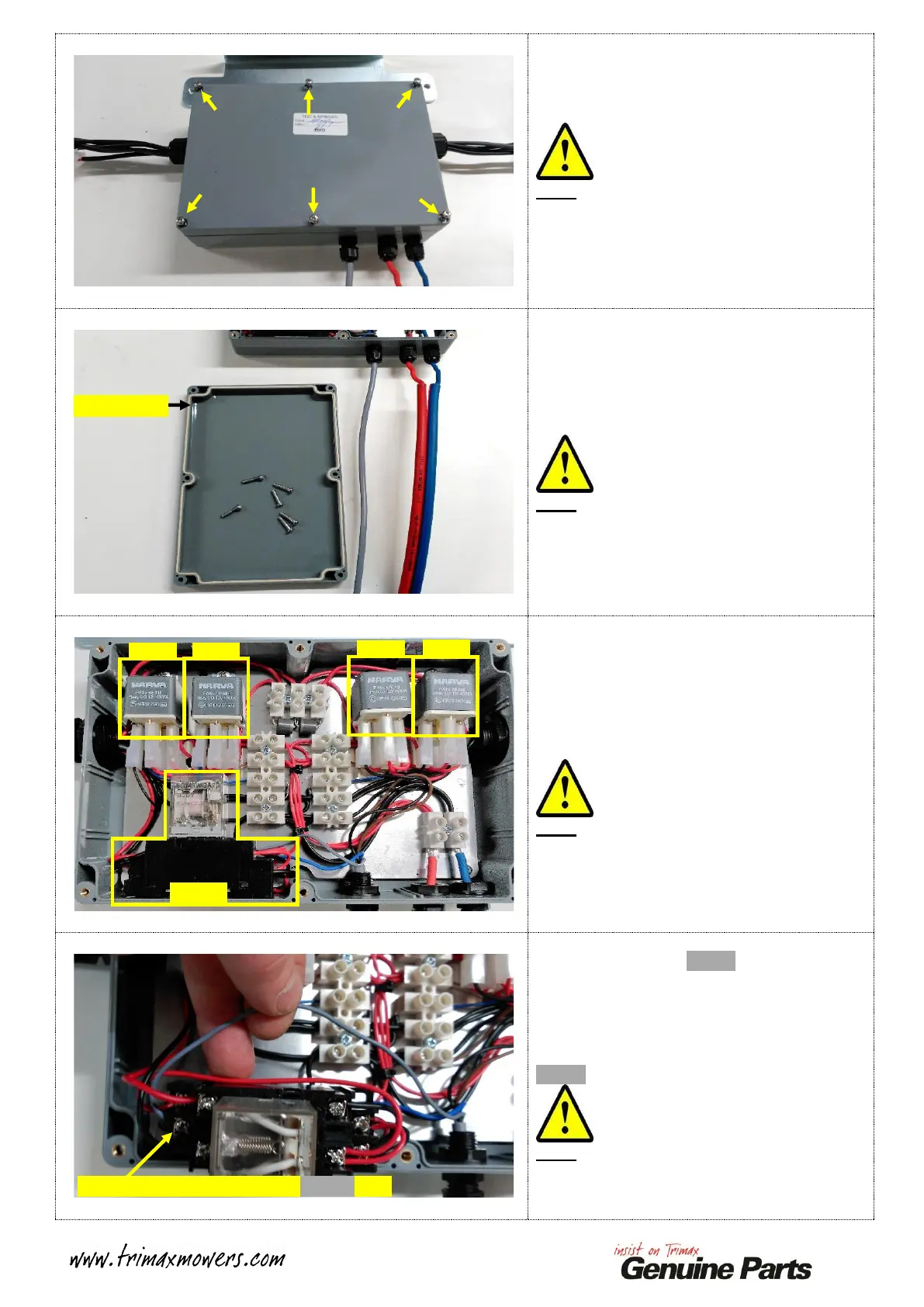
Firstly, remove the six small screws from the
the Top Cover of the Command Module.
Note:
This process can be achieved while the
Command Module is still fitted to the Pegasus,
there is no need to remove it!
Lift the Top cover off of the Command
Module.
Place the Screws in the Cover so they do not
get lost during this process!
Note:
The seal should stay with the Top Cover. If it
does not, refit it back into the recess provided
in the Top Cover.
Identify Relay 5 using the image opposite.
Gently slide Relay 5 directly upwards until it is
free from its mounting tag. This will allow
access to the wires underneath this Relay.
Note:
This image can be used to identify the Relay
positions throughout this process!
Identify and trace the GREY wire running from
the I.L.S. Control Cable to Relay 5.
Take note of the termination point of this wire,
this is labelled on this Relay as POSITION 7.
Slacken the retaining Screw to release the
GREY wire.
Note:
There is no need to remove the retaining Screw
entirely!
Slacken this screw to remove GREY wire


 To Next Page
 Loading...