Trimax
Satellite-Meter ENG 8
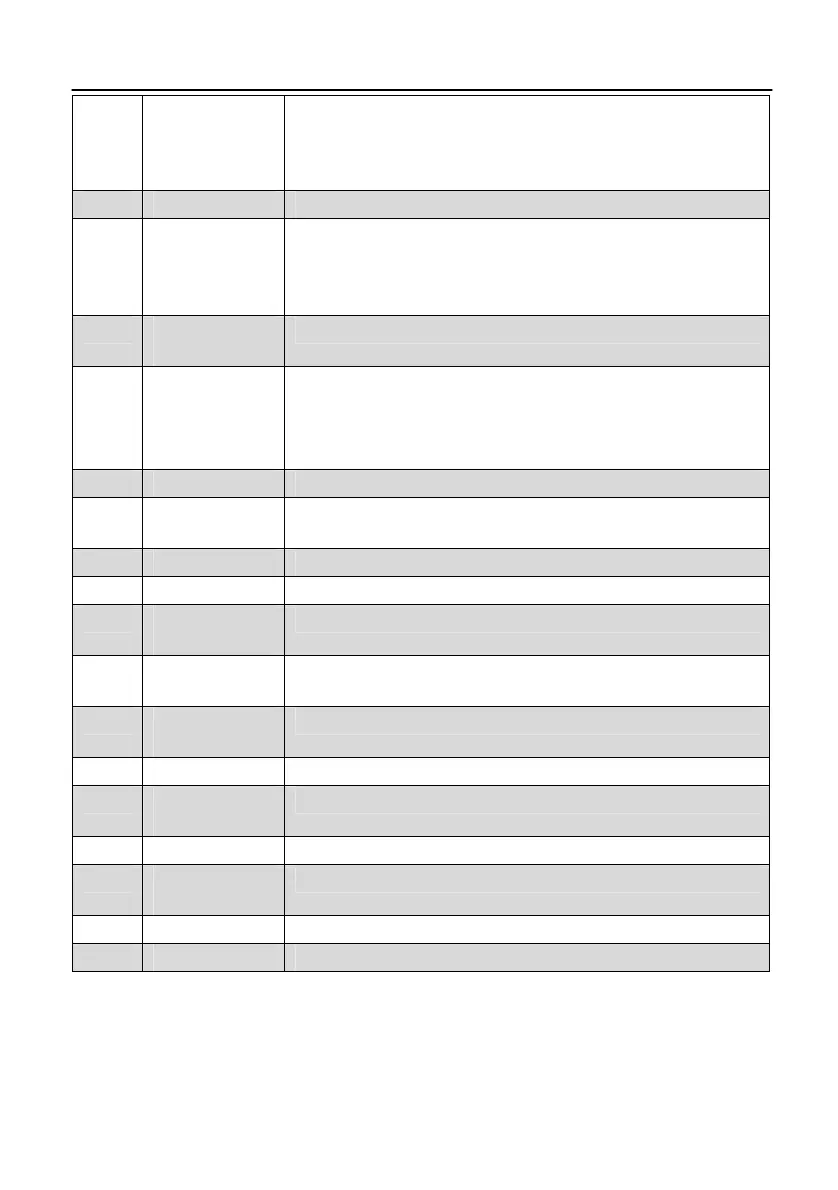
Off: the measuring devise is switched off.
In charge:
Green: The battery is charged
Red: The battery is full charged
4 LOCK-LED LED lights when a signal is received.
5
FUNCTION
keys
F1: toggle the Display
F2: Mute
F3: Additional information about the current program
F4: switch between radio/TV mode
5.1
22K/13V/18V
-LEDs
Lights if 22K/13V/18V signals are received
6
6.1
Navigation-
cross
OK - button
Navigation through menus,
switching programs ▲, ▼
volume control ◄, ►
OK button: confirmation of a selection
7 Numeric keys Direct enter of numbers
8 FIND-button
FIND menu: for a quick and easy alignment of a
satellite antenna
9 Menu-button Display the main menu
10 EXIT-button Leave the current menu, cancel operation
11
ANGLE-
button
Display the calculation menu
12
SYSTEM-
button
Configuration of all system parameter.
Display current software version.
13
POWER-
button
Switch devise on/off
14 SCAN-button Display the auto scan menu
15
AC adapter
port
Low volt port – for power supply connection
16 USB-Port USB port for PC connection
17
SPTRUM
button
Display the menu of spectrum
18 AV button Press for AV in and out
19 AV port AV input / output



 To Next Page