2
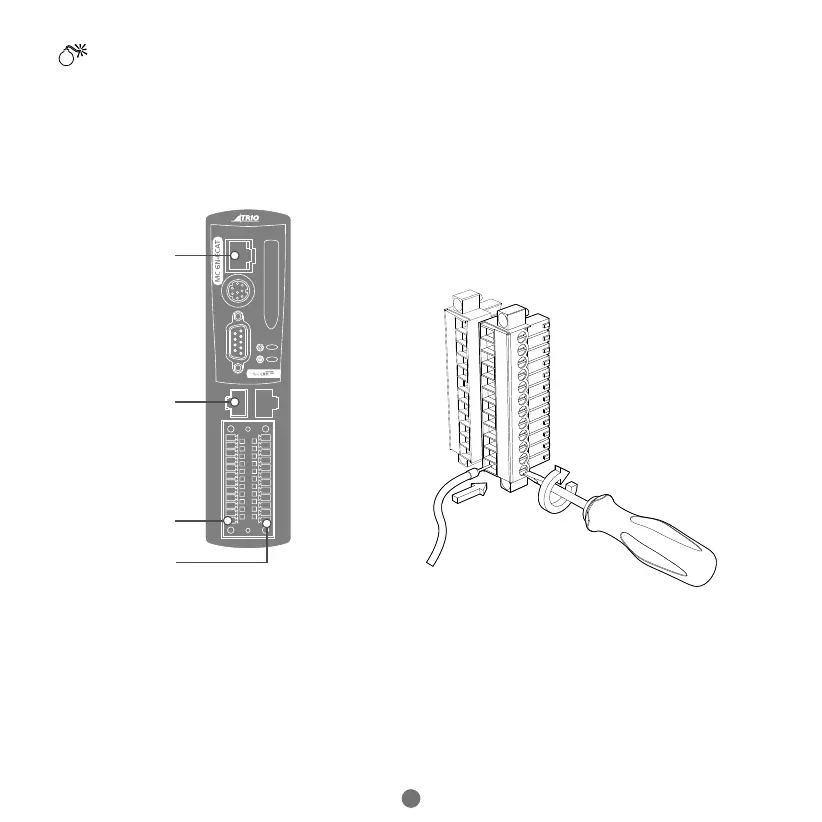
MINIMUM CONNECTIONS
PROGRAMMING PORT
ETHECAT PORT
0V
24V
OPTIONAL CONNECTIONS
Serial ports
Auxiliary Flexible Axis Port
I/O Connections
Enable (Watchdog)
CONNECTORS
I/O / Power (24V) connector:
Note: Use ferrules on all wires for best connection.
1. Connection: Push wire into hole of connector. Tighten
screw. Insert connector into MC6N.
2. Removal: Reverse the procedure.
SAFETY WARNING
During the installation or use of control systems, users of Trio products must ensure that there is no possibility of injury to any
person or damage to machinery.
Control systems, especially during installation, can malfunction or behave unexpectedly. Bearing this in mind, users must
ensure that even in the event of a malfunction or unexpected behaviour, the safety of an operator or programmer is never
compromised.


 To Next Page