Need help?
Do you have a question about the Trio Stealth G4 10.1" and is the answer not in the manual?
Avoid water, extreme temperatures, heat sources, and high volume to prevent damage and injury.
Use only the provided charger; do not attempt to service internal parts to avoid damage or voiding warranty.
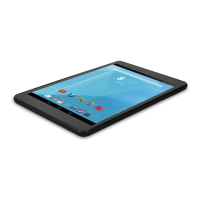
Identifies front camera, power button, and volume controls on the tablet's front.
Locates speaker, rear camera, USB/Charger Port, headphone jack, microphone, and microSD slot.
Instructions for charging the tablet's battery for the first time.
Steps to turn on the tablet and unlock the home screen.
Details the operation of external buttons like power and volume.
Explanation of on-screen icons and their dynamic appearance.
Description of USB/Charger Port, Audio Jack, and Micro-SD Card Slot.
How to check battery status and approximate charging time.
Procedure for resetting the tablet and connecting to a PC for file transfer.
Accessing and managing wallpaper, apps, and system settings.
Navigating files and using the web browser.
Adjusting Wi-Fi, brightness, and other system configurations.
Lists supported audio, video, and image file types.
Finding, playing, and managing music, including playlist creation.
Steps to play video files and manage images (view, zoom, edit).
Configuring POP3/IMAP accounts and sending emails.
Procedures for deleting email accounts and managing inbox.
Instructions for navigating websites and setting the homepage.
Adjusting volume levels and screen brightness.
Setting device sleep time and securing access with password, PIN, or pattern.
Viewing available storage space and safely removing the SD card.
Adjusting date/time, time zone, and changing the display language.
Guide to installing apps using APK files via the file manager.
Steps to remove installed applications from the tablet.
Addresses slow power-up, Wi-Fi connection, and internet surfing problems.
Explains device warming and slowness due to multiple running applications.
Details the one-year limited warranty, exclusions, and service procedures.
Procedures for reporting shipping discrepancies and damage.
Outlines limitations on consequential and indirect damages.


 To Next Page
 General