15
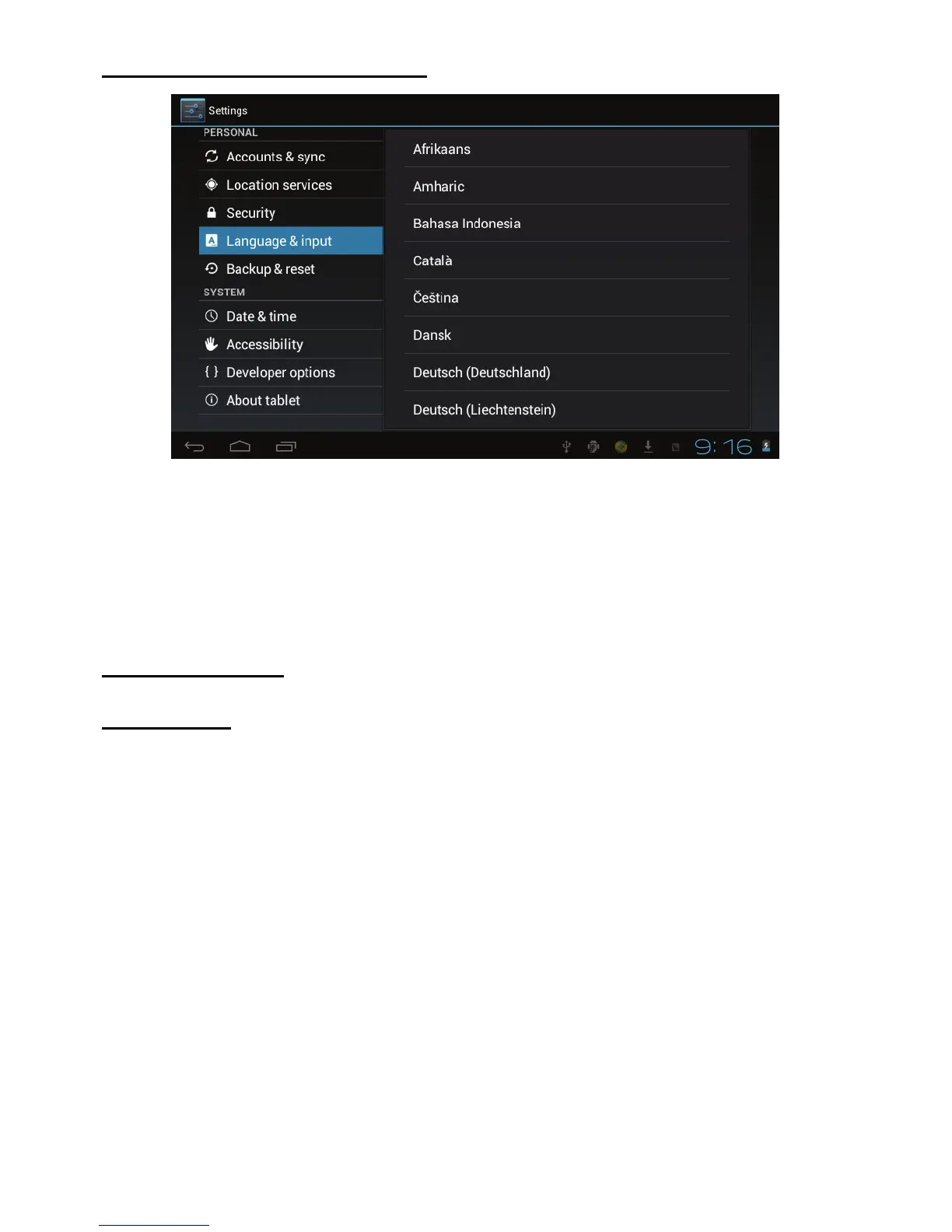
Setting the display Language
1. Tap the setting icon.
2. Tap language & input.
3. Tap language, and select the language you want. There are 60
languages to choose from.
About the Tablet
Multi-Media
Your device supports the following media formats
Audio file formats supported:
MP3,WMA(nonencrypted),MP2,OGG,AAC,M4A,MA4,FLAC,APE,3GP,WAV
Supported video formats:
AVI(H.264、DIVX、DIVX、XVID), rm,rmvb, MKV(H.264、DIVX、
DIVX、XVID),WMV (non encrypted) ,MOV,MP4(.H.264、MPEG、
DIVX、XVID),DAT(VCD),VOB(DVD),PMP, MPEG,MPG, FLV
(H.263,H.264),ASF ,TS, TP,3GP,MPG



 To Next Page