Cause
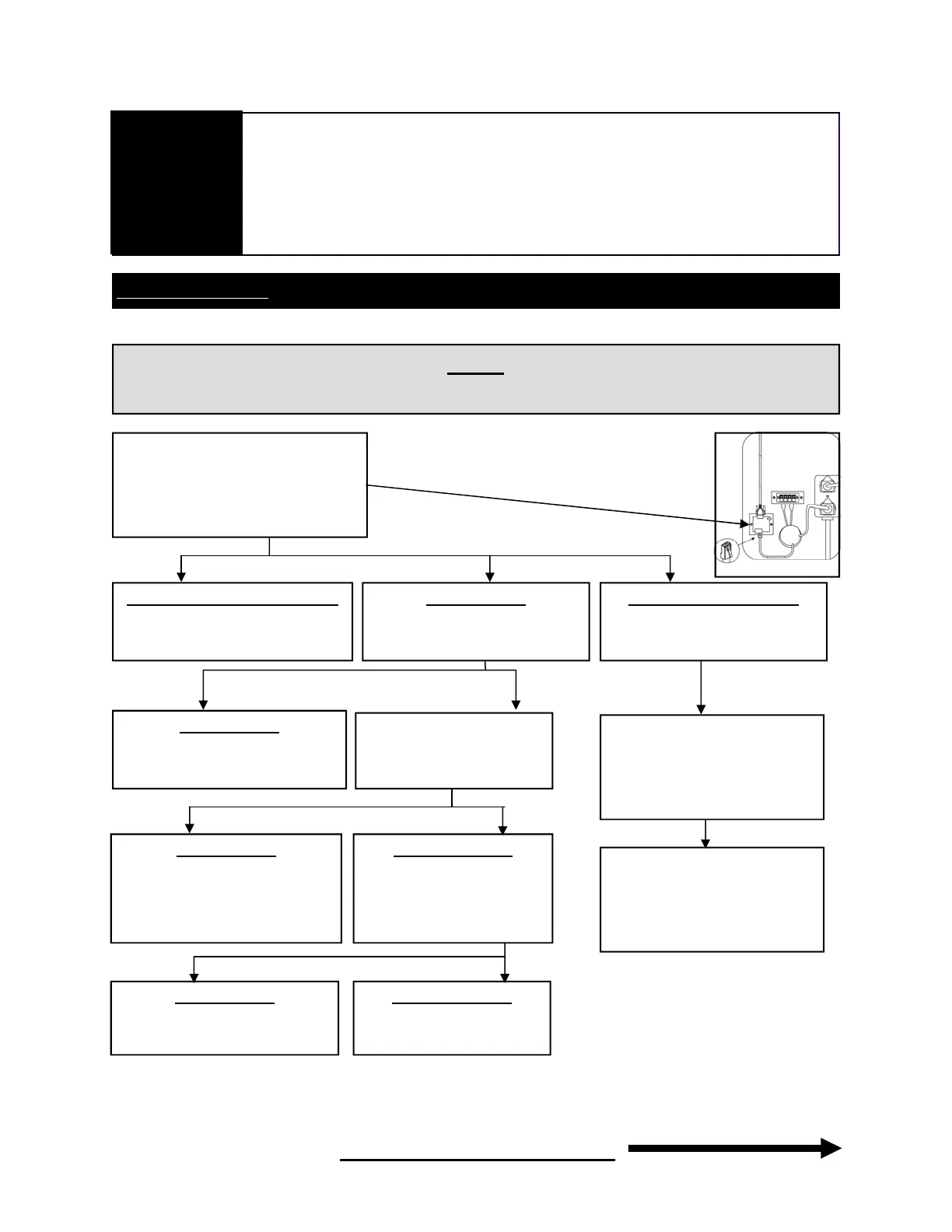
- No communication or no power going to actuators.
Step 1
-Open service door on bottom
left in the back of the game.
-Look inside at Actuator
control Board.
Light is RED or GREEN (LED)
-Go to next step
No light (LED)
-Check power on board power
cord.
There is power
-Replace Actuator control board.
-Verify power output on Po-
wer Supply (top right of the
back of the game).
There is power
-Replace Power Cord between
Power Supply and Actuator
Control Board.
There is no power
-Verify power Input on Power
supply ( red LED),
There is power
-Replace Power Supply.
There is no power
-Replace Power Cord going
Not Responding
Continued next page
Diagnostic screen and error codes
Continued
Troubleshooting
21
Light is YELLOW (LED)
-Check power on board power
cord.
-Unplug power cord on board.
Disconnect network and serial
cables. Re-connect power cord.
If light is yellow replace board, if
green goto next step.
-Reconnect network cable, if light
turns yellow replace network
cable. If light is green reconnect
serial cable, if light turns yellow
replace serial cable.


 To Next Page