2
1
3
2
4
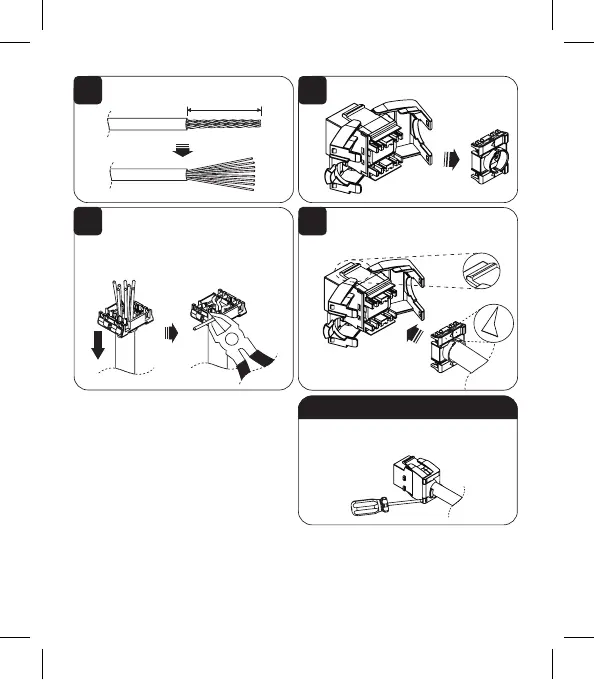
Remove approximately 30 mm of cable
sheath.
Pass the cable end through the wire cap.
Set each color-coded wire to its matching
color position on the cap. Use wire cutters
to remove any excess wire.
Use a flathead screwdriver to
unlock the keystone jack.
30 mm
Wire Cap
Latch Tab UP
To Disconnect:
Release the keystone jack wire cap.
Ensure the wire cap is correctly aligned
with the connector’s latch tab. Press the
wire cap into the jack and lock it in place.
Note: To maximize performance with Power over
Ethernet (PoE) applications, these keystone jacks
are specifically designed to prevent spark gap
erosion that degrades the plug and jack contacts
over time and can impact data and/or power
transmission capabilities.
20-11-065 9338DC_RevB
20-11-065_9338DC.indd 220-11-065_9338DC.indd 2 6/22/2021 3:16:45 PM6/22/2021 3:16:45 PM


 To Next Page