5
1
Power ON/OFF LED: An LED illuminates to indicate the switch is receiving power.
2
Port LEDs: There is one LED per RJ45 port. The LED is ON when a connection is
present and blinks when the port is active.
Note: Not compatible with PoE (Power-over-Ethernet) applications. NG5/NG8 models Link/ACT LED
is green for 10/100 Mbps and Amber for 1000 Mbps connections.
3
Gigabit Ethernet Ports: The 5 or 8 twisted-pair RJ45 ports support auto-negotiable
10/100/1000 Mbps and auto MDI/MDIX cross-over detection functions for true “plug
and play” capability.
4
Input: DC power input from the external power supply.
Quick Installation
Desktop Installation
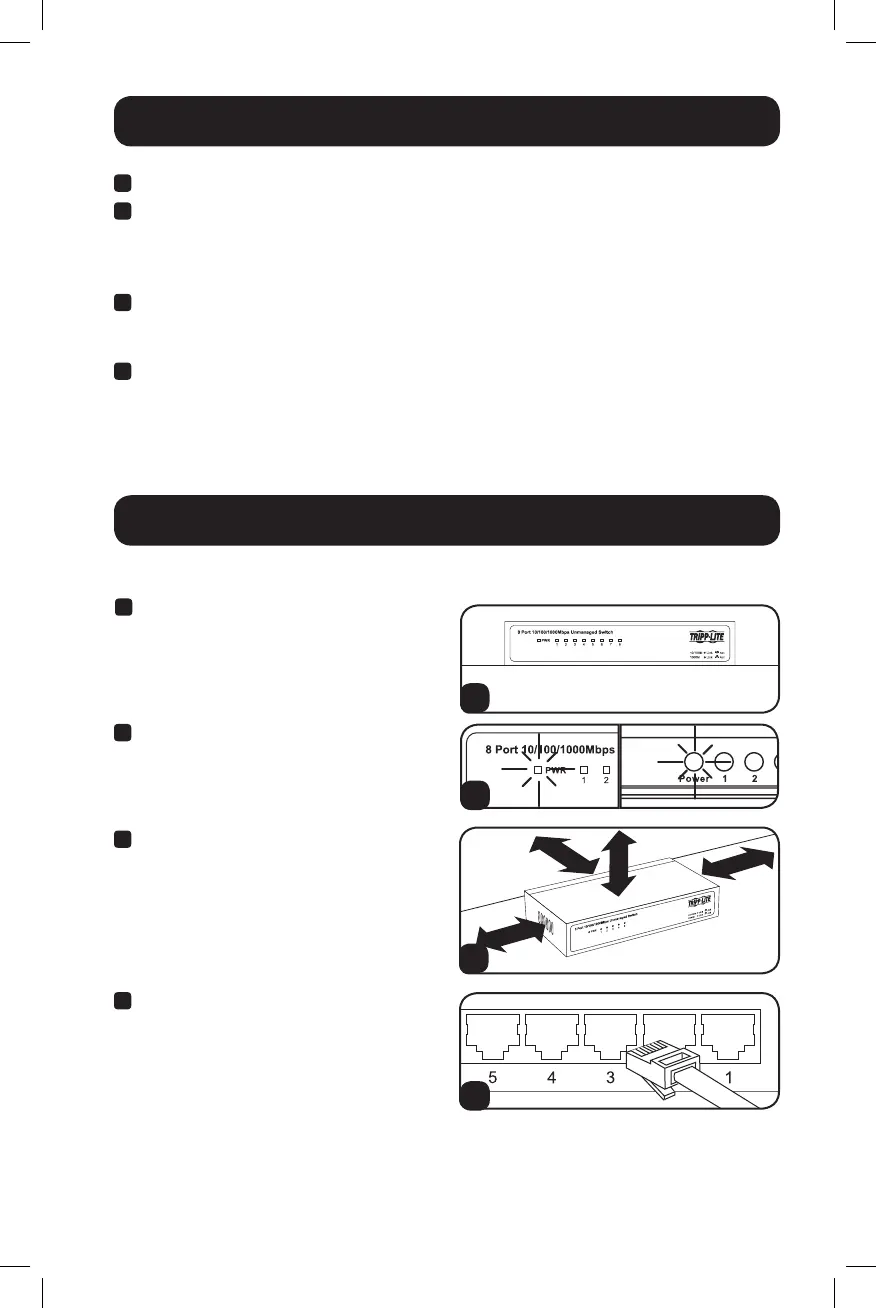
1
Place the switch on a flat desktop
surface. Inspect and install the power
adapter to a proper AC power source.
1
3
4
2
Product Features
2
Connect the power supply to the switch.
The Power LED will illuminate when the
switch turns on.
3
Ensure adequate ventilation around the
switch for proper cooling.
4
Connect the network cables to the
network switch.
16-04-017-9335AB.indb 5 4/11/2016 3:29:41 PM


 To Next Page