6
Installation
4-3
Select Option 3: IPv4 setting, or Option 4: IPv6 settings. Select Option 1: Method. Select
Option 2: Static.
Assign the address, subnet mask, gateway, etc. Save your settings by selecting “A” (apply).
Choose “y” to restart PowerAlert now. Close your terminal session.
4-4
Remove Cable: Remove the cable and proceed to the Test Network Connection section.
Network Settings
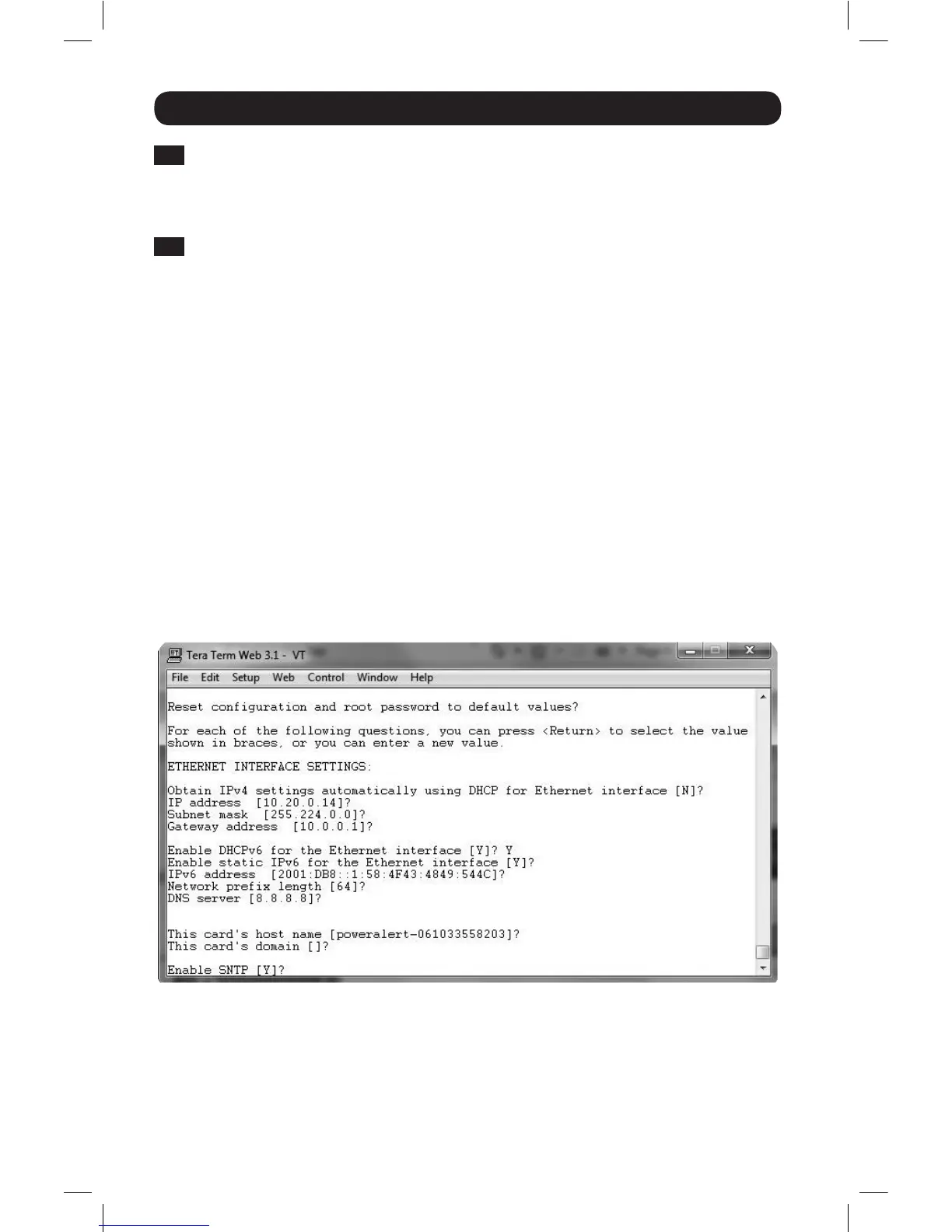
Follow the prompts to configure IPv4 and IPv6 address settings. The default terminal mode
password is TrippLite. Sample IP settings are shown—supply your own IP information when you
configure your card.
ETHERNET INTERFACE SETTINGS:
Obtain IPv4 settings automatically using DHCP for Ethernet interface? [Y]
IP address? [10.1.0.165]
Subnet mask? [255.0.0.0]
Gateway address? [10.0.0.1]
Enable DHCPv6 for the Ethernet interface? [Y]
Enable static IPv6 for the Ethernet interface? [N]
IPv6 address? [2001:DB8::1:58:4F43:4849:544C]
Network prefix length? [64]
DNS server? [10.0.0.8]
This card’s host name? [poweralert-061033462177]
This card’s domain? [tlsoftwaredev.local]
16-10-211-933668.indb 6 12/22/2016 11:36:15 AM


 To Next Page