EasyManua.ls Logo

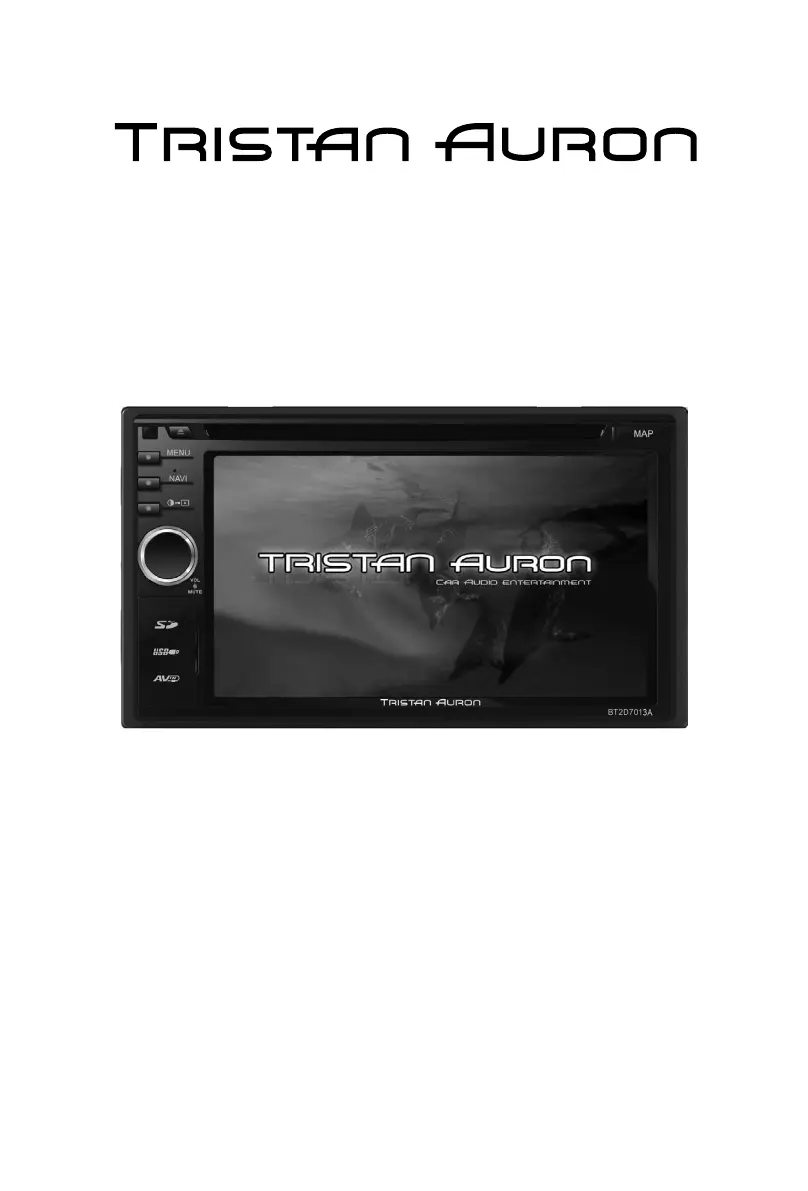
Tristan Auron BT2D7013A - User Manual

Tristan Auron BT2D7013A
58 pages
Go to English
Print Icon
To Next Page IconTo Next Page
Loading...
Betriebsanleitung
DVD/VCD/CD/MP3/MP4/SD/USB PLAYER
FM/AM TUNER
TV, GPS & Bluetooth
BT2D7013A

Table of Contents

Questions and Answers

  • C
    Christopher DorseyAug 20, 2025
    Why is there no audio output from my Tristan Auron Tuner?
    • D
      Daniel HernandezAug 20, 2025
      If you're experiencing no or low audio output from your Tristan Auron Tuner, there are several possible reasons: * The audio output connection might be improperly wired: check the wiring and correct as necessary. * The volume could be set too low: increase the volume level. * The speakers might be damaged: consider replacing the speakers. * The volume balance might be heavily biased: adjust the channel balance to the center position. * Speaker wiring might be in contact with metal parts of the car: insulate all speaker wiring connections.
  • E
    Evelyn MorganAug 22, 2025
    How to fix Tristan Auron Tuner that can not power on?
    • W
      William NavarroAug 22, 2025
      If your Tristan Auron Tuner unit cannot power on, it might be due to a blown fuse. Check the unit fuse and the car battery fuse; if either is blown, install a new fuse with the correct rating. If the issue persists, try resetting the unit, as it might be due to an illegal operation.
  • S
    Stephanie JohnsonAug 25, 2025
    What to do if my Tristan Auron Tuner has poor sound quality?
    • J
      Joshua NelsonAug 25, 2025
      If you're experiencing poor sound quality or distortion with your Tristan Auron Tuner, consider the following: * If you are using a pirated disc, switch to an original disc. * If the speaker power rating doesn't match the unit, replace the speakers. * Check the wiring and correct any wrong connections or shorted speakers.
  • E
    Elizabeth SaundersAug 26, 2025
    Why is my Tristan Auron Tuner screen flashing?
    • B
      Bryan DavisAug 26, 2025
      A flashing image or interference on the screen of your Tristan Auron Tuner can occur due to several reasons: * The color system of the DVD disc may not match the monitor: adjust the color system of the DVD disc or the monitor. * A pirated disc might be in use: use an original disc. * The video cable could be damaged: replace the cables. * There might be improper video signal connections: check the wiring and correct it.
  • A
    Alicia RangelAug 27, 2025
    Why won't my Tristan Auron Tuner play the disc?
    • D
      Dale ChavezAug 27, 2025
      If your Tristan Auron Tuner isn't playing a disc, it could be due to several reasons: * The disc might be warped or scratched: use a disc in good condition. * The disc may be dirty or wet: clean it with a soft cloth. * An incompatible disc might be used: use a compatible disc. * The disc might be inserted upside down: insert it with the label side up. * The disc region code may not be compatible with the unit: use a disc with the proper region code.
  • P
    Philip ThompsonAug 29, 2025
    Why does my Tristan Auron Tuner reset when the engine is off?
    • J
      Johnny TaylorAug 29, 2025
      If your Tristan Auron Tuner resets itself when the engine is off, it is likely due to an incorrect connection between ACC and BATT. Check the wiring and correct it.
  • D
    Daniel BurnsAug 31, 2025
    Why is warning information always shown on my Tristan Auron Tuner?
    • J
      Jennifer McleanAug 31, 2025
      If warning information is constantly displayed on your Tristan Auron Tuner, the parking brake wiring is likely incorrect. Check the wiring and correct it.
  • A
    Anthony BellSep 2, 2025
    What to do if I cannot insert a disc into my Tristan Auron Tuner?
    • M
      Mrs. Pamela TaylorSep 2, 2025
      If you cannot insert a disc into your Tristan Auron Tuner, it's possible that a disc is already inside the unit. Eject the current disc before inserting a new one.
  • J
    Jason SavageSep 4, 2025
    How to fix Tel-Mute malfunction on Tristan Auron Tuner?
    • K
      Kimberly KirbySep 4, 2025
      If you are experiencing a Tel-Mute malfunction on your Tristan Auron Tuner, the 'MUTE' wire might be grounded. Check the ‘MUTE’ wiring and correct it.
  • K
    Kristin PittsSep 6, 2025
    Why does my Tristan Auron Tuner say 'No disc'?
    • J
      Judith WhiteSep 6, 2025
      If your Tristan Auron Tuner displays 'No disc', it could be due to a few reasons: * The disc might be dirty: clean the disc with a soft cloth. * The disc might be upside down: insert the disc with the label side up. * There might be no disc inside: insert a disc.

Summary

Safety Precautions

Power and Installation Safety

Warnings on fuse, 12V power, installation location, and moisture hazards.

Driving and Operational Safety

Advice on video display during driving and maintaining safe volume levels.

Unit Malfunction Guidance

Symptoms requiring dealer contact and general operational warnings.

Before Using - Front Panel

Front Panel Overview and Controls

Describes the unit's front panel buttons, knobs, and ports.

Before Using - Remote Control

Remote Control Functions

Details the functions of each button on the optional remote control.

Basic Operations

Core Operations (Parking Brake, Power, Mute, Volume, EQ)

Covers parking brake, power, mute, volume, and initial EQ settings.

Basic Operations - EQ Settings

Preset Equalizer and Parameters

Guide to selecting EQ modes and adjusting parameters.

Fader, Balance, and Subwoofer

Instructions for adjusting speaker balance and subwoofer volume.

Radio Mode - Tuning

Tuner Menu and Auto Tuning

Overview of tuner functions and automatic station seeking.

Radio Mode - Stations and RDS

Playback Mode - Media Handling

Disc and USB;SD Card Operations

Loading/ejecting discs, connecting/removing USB/SD devices.

Playback Mode - Navigation and Repeat

Playback Mode - Advanced Playback

Bluetooth Mode - Pairing and Calls

Pairing Bluetooth Devices

Steps to pair phones and disconnect devices.

Making and Receiving Calls

How to make calls via phone book/dial pad and receive calls.

Bluetooth Mode - Settings and Music

Troubleshooting

Common Issues and Corrective Actions

Guides on resolving common problems like no power, no audio, or disc errors.

Tristan Auron BT2D7013A Specifications

General IconGeneral
BrandTristan Auron
ModelBT2D7013A
CategoryTuner
LanguageEnglish