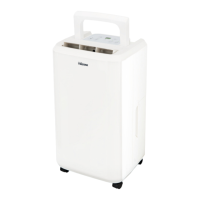
This document provides an instruction manual for the Tristar AC-5410 dehumidifier, outlining its safety warnings, parts description, operation, cleaning, maintenance, storage, troubleshooting, and guarantee information.
Safety Warnings
When operating the unit, several safety precautions must be observed. This appliance is suitable for use by children aged 8 years and above, as well as individuals with reduced physical, sensory, or mental capabilities, or lack of experience and knowledge, provided they receive supervision or instruction on safe use and understand the associated hazards. Children should not perform cleaning or user maintenance without supervision and must not play with the appliance.
Before cleaning or storing the unit, the power supply cord must be unplugged. The unit should not be submerged in water or placed near water. Avoid positioning the unit near heat-generating devices or flammable and dangerous materials. Never insert fingers or objects into the intake or discharge ducts. Do not sit or stand on the unit. Collected water in the tank should be discarded as needed. The dehumidifier must not be operated in a closed area, such as inside a closet, as this could pose a fire risk. If continuous drainage is desired, install drain piping at a downhill grade to ensure proper water flow. If the power supply cord is damaged, it must be replaced by the manufacturer or a qualified service agent.
Parts Description
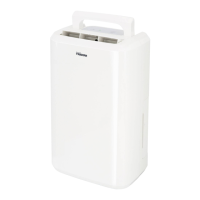
The unit consists of a front shell, an outlet, a handle, a control panel, a filter box, a back shell, a tank, rubber feet, and a supply cord. The display features a water full LED, a compressor LED, a defrost LED, a timer LED, a digit display, a power button, a down button, an up button, and a timer button.
Before the First Use
Before using the appliance for the first time, remove it and its accessories from the box, including any stickers, protective foil, or plastic. Wipe all removable parts with a damp cloth; abrasive products should not be used. Place the device on a flat, stable surface, ensuring a minimum of 20 cm of free space around it. This device is not suitable for installation in a cabinet or for outdoor use.
Ensure the power cable is plugged into a socket, verifying that the voltage indicated on the device matches the local voltage (220V~240V 50/60Hz). To prepare the air filter, open the inlet grill, remove the air filter, remove the plastic bag from the carbon filter, place the carbon filter into the dehumidifier, then replace the air filter, and finally close the inlet grill.
Operation
To start or stop the dehumidifier, press the Power button.
Draining the Collected Water
When the drainage tank is full, the "tank full" indicator light will illuminate, the operation will stop automatically, and a buzzer will beep 15 times to alert the user that the water needs to be emptied.
Emptying the Drainage Tank
To empty the tank, lightly press on its sides with both hands and gently pull it out. Discard the collected water. Do not remove the float from the water tank, as this will prevent the water full sensor from detecting the water level correctly, potentially leading to water leakage.
Continuous Water Drainage
The unit is equipped with a continuous drainage port. To use this feature, remove the water tank and place a plastic pipe (with an inner diameter of 10mm) over the water outlet of the unit. Guide the drainpipe through the hole of the water tank and then replace the water tank. This setup allows water to drain continuously from the unit.
Cleaning and Maintenance
To clean the unit, wipe it with a soft, damp cloth. For the air filter, first open the inlet grill and remove the filter. Use a vacuum cleaner to lightly clean the surface of the air filter to remove dirt. If the air filter is exceptionally dirty, wash it with warm water and a mild cleanser, then dry it thoroughly. Insert the cleaned filter smoothly back into the grill, ensuring the inlet grill is correctly placed.
If the drainage tank is dirty, wash it with cold or lukewarm water. Avoid using detergents, scouring pads, chemically treated dust cloths, gasoline, benzene, thinner, or other solvents, as these can scratch and damage the tank, leading to water leakage. When replacing the drainage tank, press it firmly into place with both hands. If the tank is not positioned properly, the "TANK FULL" sensor will activate, and the dehumidifier will not operate.
Storing the Dehumidifier
When storing the unit for an extended period, follow these steps:
- Empty any remaining water from the drainage tank.
- Fold up the power supply cord and place it in the water tank.
- Clean the air filter.
- Store the unit in a cool and dry place.
Troubleshooting
If the unit experiences issues, check the following before contacting customer service:
- Operation is noisy: Check if the unit is tilted or unsteady. Move it to a stable, sturdy location. Also, check if the air filter is clogged and clean it as instructed under "Cleaning and maintenance."
- E1 Code: This indicates a pipe temperature sensor failure. The pipe temperature sensor needs to be replaced.
- The unit doesn't operate: Check if the room temperature is above 35°C or below 5°C. The protection device may be activated, preventing the unit from starting.
- The dehumidifying function doesn't work: Check if the air filter is clogged and clean it. Also, check if the intake or discharge duct is obstructed and remove any obstructions.
- No air is discharged: Check if the air filter is clogged and clean it as instructed.
Guarantee
This product comes with a 24-month guarantee. The warranty is valid if the product is used according to the instructions and for its intended purpose. The original purchase document (invoice, sales slip, or receipt) with the date of purchase, retailer's name, and item number must be submitted. For detailed warranty conditions, refer to the service website: www.tristar.eu.
Guidelines for Protection of the Environment
This appliance should not be disposed of with domestic garbage at the end of its lifespan. Instead, it must be offered at a central point for the recycling of electric and electronic domestic appliances. The symbol on the appliance, instruction manual, and packaging highlights this important issue. The materials used in this appliance are recyclable. By recycling used domestic appliances, you contribute significantly to environmental protection. Contact your local authorities for information regarding collection points.


 To Next Page
 General