15
INTRODUCTION
IMPORTANT
PRECAUTIONS
ASSEMBLY
BEFORE
YOU BEGIN
TREADMILL
OPERATION
CONDITIONING
GUIDELINES
TROUBLESHOOTING
& MAINTENANCE
LIMITED
WARRANTY
Note: There is a thin protective sheet of clear plastic on the overlay of the console and should be removed.
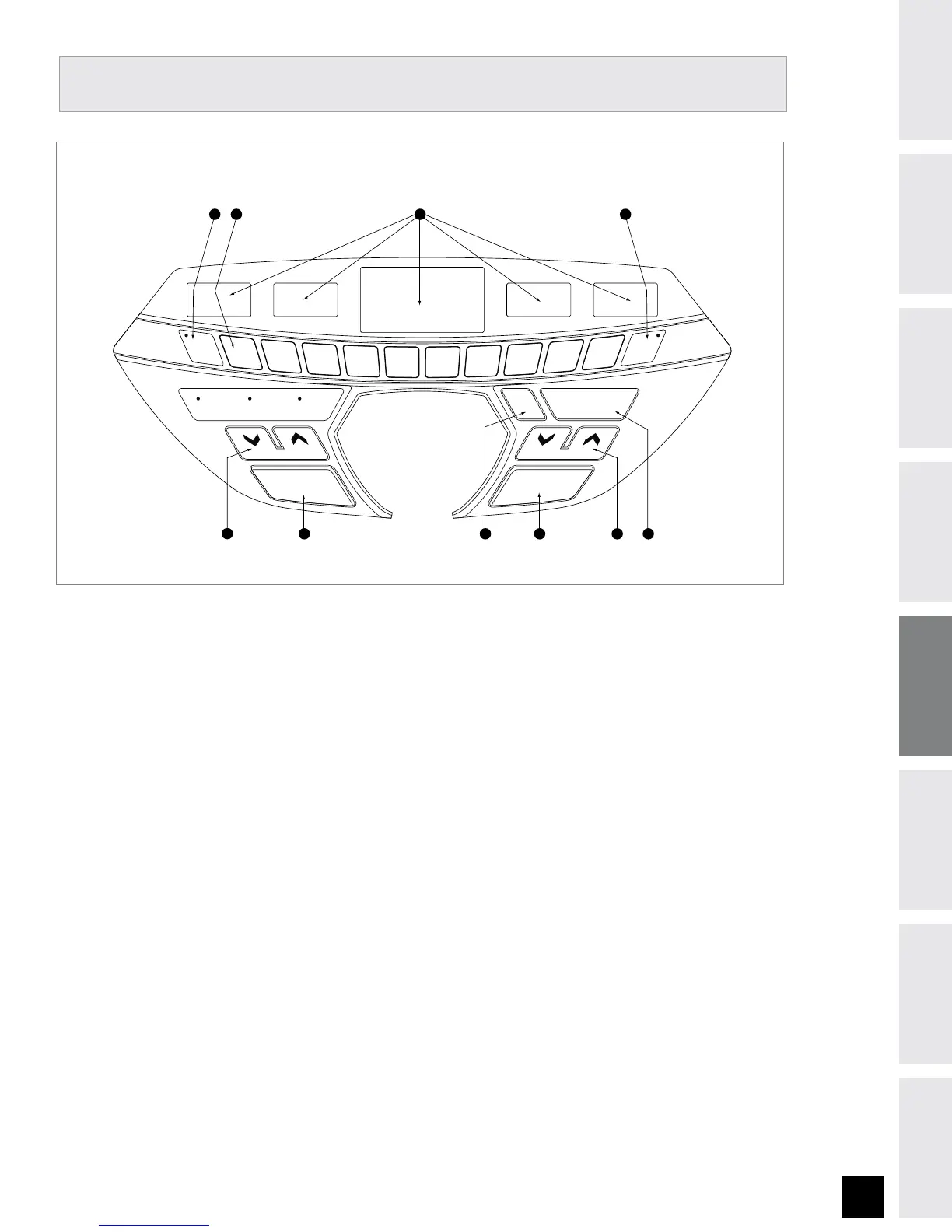
A) MONITOR DISPLAY:
Speed, Time, Pulse, Distance, Incline, and Calories.
B) STOP:
Press to pause/end your workout. Hold for 3 seconds to reset the treadmill.
C) START:
Simply press to begin exercising or starts your program.
D) INCLINE KEYS:
Used to change incline.
E) SPEED KEYS:
Used to change speed.
F) FAN: Press to turn fan on / off.
G) ENTER: Used to select Program and Time.
H)
PRESS TO SET INCLINE KEY: Used to confirm chosen incline. Press before selecting INCLINE.
I) PRESS TO SET SPEED KEY: Used to confirm chosen speed. Press before selecting SPEED.
J) QUICK ADJUST INCLINE / SPEED KEYS: Used to reach desired incline or speed more quickly.
Select after pressing PRESS TO SET INCLINE / SPEED KEY.
TREADMILL OPERATION
A D J U S T S P E E DA D J U S T I N C L I N E
1
2
3
4 5
6
7
8
9
10
STEP 1
SELECT PROGRAM
(+/-), PRESS ENTER
STEP 2
SELECT TIME (+/-),
PRESS ENTER
STEP 3
PRESS START
FAN
ENTER
DISPLAY / SCAN
A
D
I
J
BC
H
F G
E
PRESS
TO SET
SPEED
PRESS
TO SET
INCLINE
STOP
HOLD TO RESET
START
PAUSE


 To Next Page