Failed to TWS Pair
1.Turn off both earbuds.
2.Hold the mulfuncon buon for 5 seconds on both earbuds unl the red and blue
light flashes alternately and then tap the buon on both earbuds for four mes unl
the indicator light goes off.
3.Hold the buon on both earbuds for 3 seconds unl the blue light goes on and then
the two earbuds will automacally enter True Wireless Stereo pairing mode.
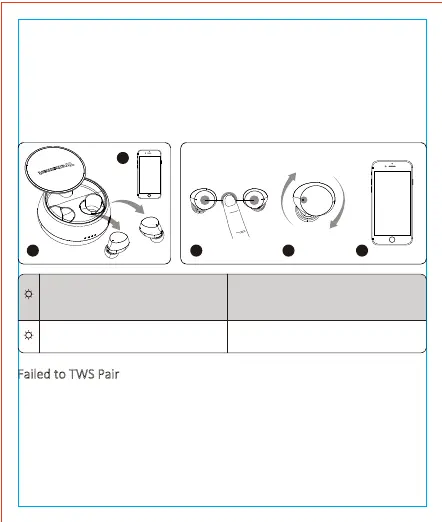
2.True Wireless Stereo Pairing
The earbuds automacally enter True Wireless Stereo pairing mode when two
earbuds are taken out of the charging case.
When both earbuds are turned off, hold the mulfuncon buon for 3 seconds on
both to turn them on manually and then the two earbuds will enter to pairing mode
automacally.
Then turn on your device’s Bluetooth seng and search for ‘Tronsmart Spunky Pro’
to pair. Keep your device close while pairing (recommended distance ≤1m).
1 1 2 3
2
Tronsmart
Spunky Pro
1...2...3...4...5
Tronsmart
Spunky Pro
Blue
Red
Red & blue light flashes alternately
(Le earbud)
Goes off (Right earbud)
The Le earbud is paired with the Right
earbud successfully, but sll not paired
with your device.
Goes off
Two earbuds are paired with your
device.
03


 To Next Page