Hold for 3 seconds.
Hold for 5 seconds.
Hold for 2 seconds to acvate voice assistant
including Siri, Google and other local Android
voice assistants that run on Samsung, Huawei,
Xiaomi and other devices.
Tap once.
Hold for 2 seconds.
Tap once.
Tap twice.
Tap three mes.
Tap twice.
Tap three mes.
L/R
L/R
L/R
L/R
L/R
L/R
R
R
L
L
Turn On
Turn Off
Voice Assistant
Answer/End Call
Reject Call
Play/Pause
Next Track
Previous Track
Volume Up
Volume Down
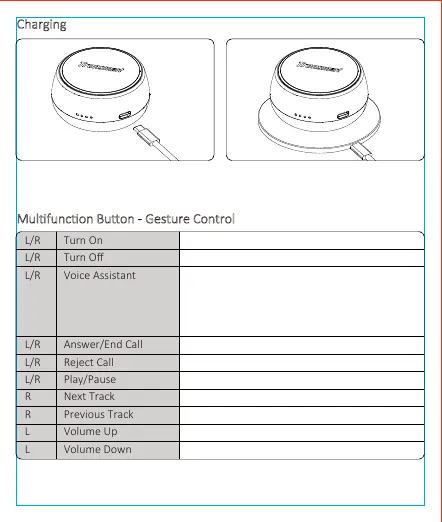
Charging
Mulfuncon Buon - Gesture Control
1.USB-C Cable Charging 2.Wireless Charging:
Supports Qi wireless charging.
04


 To Next Page