Attention, when the settings are set to high sensitivity and you are driving over uneven surfaces this can cause files to be automatically protected
and the filling up of the SD card.
Timelapse
Allows you to create a video using 0.2s, 0.5s, and 1s frames.
With a permanent power supply, it enables long-term monitoring of events around a parked car.
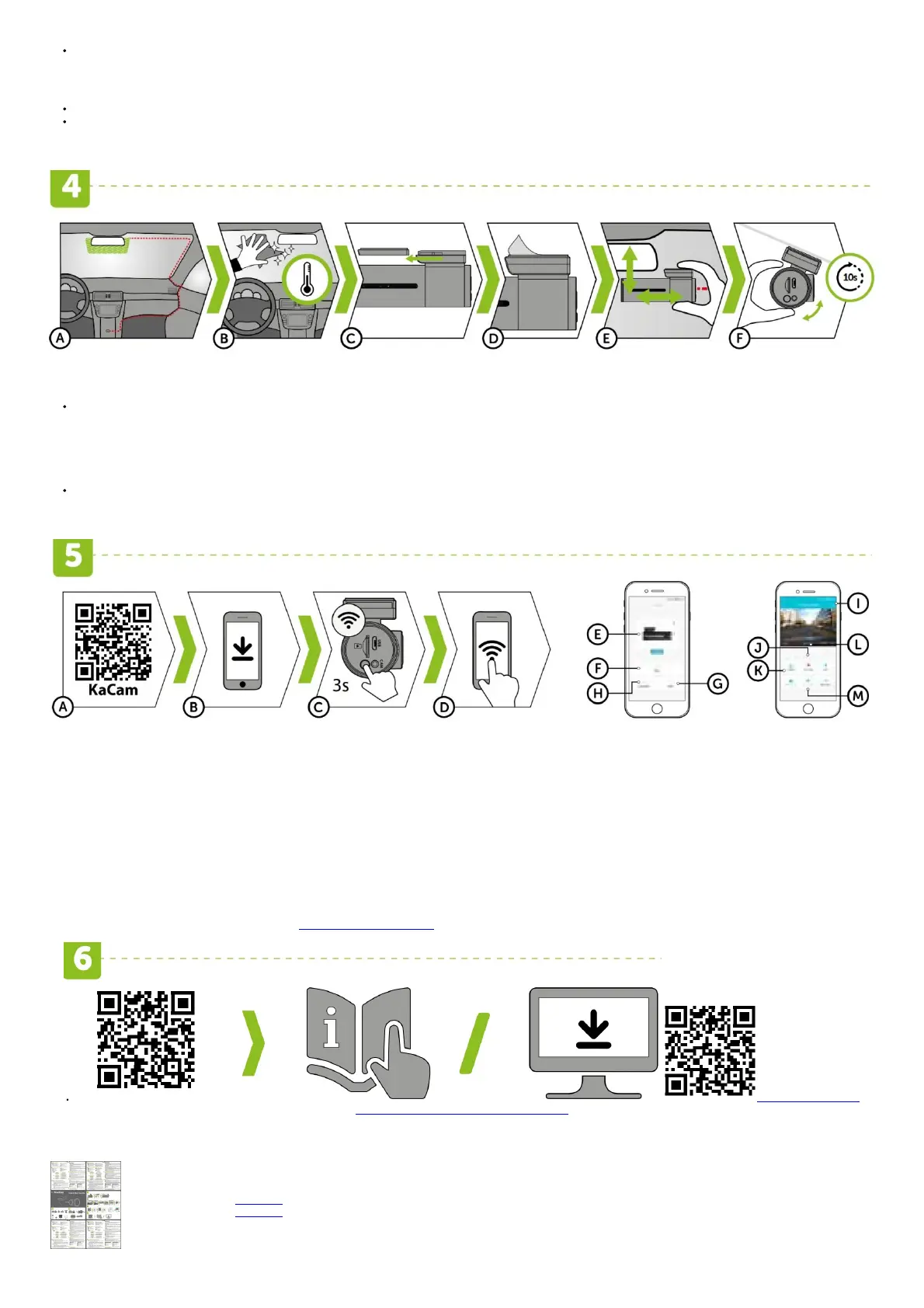
PLACEMENT ON GLASS / SAFETY PRECAUTIONS
(A) The ideal place to mount your camera is the space between the windscreen and the rear-view mirror so as not to obstruct the driver‘s view.
(B) Make sure that the glass is clean and dry at the attachment point.
The ideal bonding temperature is 20°C – 40°C.
(C) Slide the camera into the mount.
(D) Remove the film from the 3M adhesive pad on the camera holder.
(E) Before attaching it to the glass, point the camera to capture the best view.
(F) Press the 3M adhesive pad onto the glass and hold it for a while.
You can attach the electrostatic sticker between the 3M sticker and the windshield for easier removal of the holder.
WIFI APPLICATION
(A) Scan the QR code or search for KaCam on the App Store/GooglePlay.
(B) Install the app on your smartphone or tablet.
(C) Turn on WiFi on the camera by holding the WiFi button (3s) on the camera -> the camera will sound when the WiFi turns on.
(D) On your phone/tablet, connect to the WiFi network with the camera‘s name, enter the password (factory default is 12345678), launch the application, and connect to the camera.
KACAM APP CONTROLS – WITHOUT CONNECTION KACAM APP CONTROLS – WITH CONNECTION
(E) Connect the camera
(F) Files dragged to your phone
(G) Information
(H) Version Update
(I) Camera settings
(J) Start/stop recording
(K) Files in the camera
(L) Take photo
(M) Front / rear camera preview
MORE INFORMATION
You’ll find the complete manual and firmware updates at http://truecam.eu/downloads
trucam.eu/downloads
http://www.truecam.eu/firmware/#truecam-h7
File Downloads
TrueCam User Guide
H7, Professional Camera
Download [optimized]
Download



 To Next Page