EasyManua.ls Logo

Truke Buds Q1 - User Manual

Truke Buds Q1
4 pages
Print Icon
To Next Page IconTo Next Page
Loading...
Truke Buds Q1
FAQs
FIRST TIME USE INSTRUCTIONS
Remove the protective plastic film from charging pins on the Earbuds if present.
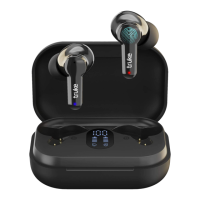
If required, remove the protective plastic film from Battery Capacity Digital display.
Place the Earbuds back in Charging case for 1 hour.
About the product
Can buds be used in monopod mode? Can i use buds as a single earbud?
Yes, take out one earbud from the case and pair it with your device.
Can the buds be connected to laptop via Bluetooth?
Yes, truke buds Q1 is compatible with all Bluetooth enabled devices.
What is the Bluetooth connection range?
Truke buds Q1 are equipped with power-efficient Bluetooth v5.1 that supports low power
consumption, superior connectivity and compatible with all Android, Windows & iOS devices. The
earbuds provide a stable and fast connection up to 10m.
Can it be used with Bluetooth 5.0 or Bluetooth 4.2?
Truke buds Q1 earbuds come with reverse Bluetooth compatibility. So, it will not be trouble
connecting with your device. We suggest connecting with Bluetooth 5.1 enabled device for
optimal performance.
What is SBC or AAC codec?
Truke buds Q1 supports both SBC & AAC codec. A codec is a program which encodes or decodes
the digital data of the music file. Switching to AAC codec could improve audio quality on your
earbuds, since AAC is a more advanced codec than SBC.
How to switch SBC to AAC codec?
While truke buds Q1 support both SBC & AAC codec, the functionality can only be switched over
the connected device. Check your device user manual for switching to SBC/AAC codec.
Are the Buds waterproof?
Truke Buds Q1 earbuds have an ipx4 rating which means that they are sweat-resistant. However,
the buds need to be completely dried before placing them back in the case.
Question and Answer IconNeed help?

Do you have a question about the Truke Buds Q1 and is the answer not in the manual?

Summary

Truke Buds Q1 FAQs

First Time Use Instructions

Steps for initial setup, including removing protective films and charging.

Monopod Mode Usage

Guidance on using a single earbud for calls or audio.

Laptop Bluetooth Connectivity

Confirms compatibility and connection to laptops via Bluetooth.

Bluetooth Connection Range

Details the Bluetooth v5.1 range and connection stability.

Bluetooth Version Compatibility

Explains compatibility with older Bluetooth versions like 5.0 and 4.2.

Audio Codec Explanation (SBC;AAC)

Defines SBC and AAC codecs and their impact on audio quality.

Switching Audio Codecs

Instructions on how to switch between SBC and AAC codecs.

Earbud Waterproof Rating

Details the IPX4 rating and sweat resistance of the earbuds.

Button Functions and Controls

Touch Controls Overview

Explains how to use touch controls for calls, music, and voice assistants.

Music Track Navigation

Instructions for skipping to the next or previous music track.

Volume Control Limitations

States that volume control is not supported directly on the earbuds.

Gaming Mode Activation

How to enter or exit Gaming Mode using the earbuds.

Voice Assistant Activation

Steps to activate Siri or Google Assistant via touch.

Device Compatibility

Smartphone Compatibility

Confirms compatibility with iPhones and Android phones via Bluetooth 5.1.

Dual Pairing Support

Clarifies that dual pairing for two devices simultaneously is not supported.

Google Fast Pair Support

States that Google Fast Pair feature has not been tested.

Automatic vs. Manual Pairing

Describes the automatic connection process after initial pairing.

Battery and Charging Information

Battery Backup and Capacity

Details earbud battery capacity and total playtime with charging case.

Charging Interface Type

Specifies that the earbuds use a Type-C charging interface.

Charging Time for Case

Information on how long the charging case takes to fully charge.

Charging Time for Earbuds

Information on how long the earbuds take to fully charge.

Troubleshooting Charging Issues

Steps to resolve earbuds not charging or powering on issues.

Troubleshooting Charger Issues

Steps to resolve issues with the charger itself not working.

Checking Battery Level

How to check the battery level of the earbuds on a smartphone.

Charging with PC;Laptop

Confirmation that earbuds can be charged using a PC or Laptop.

Fast Charging Capability

Information on power rating and compatibility with fast chargers.

Troubleshooting Common Issues

Earbuds Not Charging in Case

Steps to resolve earbuds not charging when placed in the case.

One Earbud Not Working

Detailed steps to fix issues where only one earbud is functional.

Resetting the Earbuds

Procedure for resetting the earbuds to factory settings.

Truke Buds Q1 Specifications

General IconGeneral
Driver Size10mm
Bluetooth Version5.1
Water ResistanceIPX4
Charging Time1.5 hours
Frequency Response20 Hz - 20 kHz
Impedance32 ohms