EasyManua.ls Logo

Trust 210 - User Manual

Trust 210
2 pages
Print Icon
To Next Page IconTo Next Page
Loading...
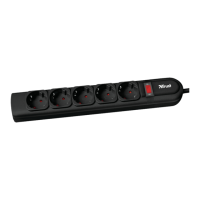
TRUST POWER PROTECTOR 210
1
1 Introduction
This instruction manual is intended for users of the ‘TRUST POWER PROTECTOR
210 ‘. If you have any questions, please consult one of the Trust Customer Care
Centers. You can find more information about these Customer Care Centers on the
last page of this instruction manual.
- The POWER PROTECTOR 210 can be used for protecting your equipment
from the power surges that may occur in the electricity supply network.
Note: Surges can be filtered up to a certain voltage. Huge surges such
as those accompanied by (near) direct lightning incidence for
example cannot be guaranteed.
2 Safety
The Power Protector 210 has been provided with a childproof receptacle outlet.
The voltage is only accessible when both poles of the plug are inserted into the Power
Protector 210 at the same time.
When using the Power Protector 210 you should take note of the following issues:
1. Do not use this appliance in a humid environment or near water.
2. Extremely high voltages may damage this appliance, although the safety of
the equipment connected with it will still be guaranteed. Do not try to repair
the Power Protector 210 in case it should be damaged.
3. Stop using this appliance in case:
a) the plug has been damaged;
b) liquid has entered the appliance,
c) the case has been damaged.
1. Only connect this appliance to a grounded wall socket.
Connecting it to a non-grounded socket is not safe.
2. Never load the Power Protector 210 with more than the maximum admissible
amperage (10 A). Exceeding the overload capacity will damage the appliance
so it can no longer be used. In this case the guarantee regulations do not
apply any longer.
3 Connection / installation
For connections refer to Figure 1 on the folding page.
A Indication LED
B Connection for plug
C Connection for plug
Note: Because the versions of the POWER PROTECTOR may differ for
each country the model may differ as well.
1. Insert the Power Protector 210 into a grounded wall socket.
2. Connect the appropriate appliance to one of the two outputs (B / C) of the
Power Protector.


Questions and Answers

Summary

Introduction to Trust Power Protector 210

Safety Precautions for Power Protector 210

Environmental and Usage Restrictions

Avoid using the appliance in humid environments or near water. High voltages can damage it.

Appliance Damage and Discontinuation

Stop using the appliance if the plug, liquid ingress, or casing is damaged.

Connection and Overload Safety

Connect to a grounded socket and do not exceed the maximum amperage of 10A.

Connection and Installation Guide

Technical Specifications

Troubleshooting Common Issues

No Voltage on Output

Check wall socket voltage or fuse. If overload, stop use and dispose of responsibly.

Indication LED Not Lighting

Power Protector may be damaged. Stop use and return to dealer for guarantee.

Summary

Introduction to Trust Power Protector 210

Safety Precautions for Power Protector 210

Environmental and Usage Restrictions

Avoid using the appliance in humid environments or near water. High voltages can damage it.

Appliance Damage and Discontinuation

Stop using the appliance if the plug, liquid ingress, or casing is damaged.

Connection and Overload Safety

Connect to a grounded socket and do not exceed the maximum amperage of 10A.

Connection and Installation Guide

Technical Specifications

Troubleshooting Common Issues

No Voltage on Output

Check wall socket voltage or fuse. If overload, stop use and dispose of responsibly.

Indication LED Not Lighting

Power Protector may be damaged. Stop use and return to dealer for guarantee.

Overview

The TRUST POWER PROTECTOR 210 is a device designed to safeguard electronic equipment from power surges that may occur in the electricity supply network. It acts as a protective barrier, filtering surges up to a certain voltage, though it's important to note that extremely large surges, such as those caused by near-direct lightning strikes, cannot be guaranteed against.

Function Description:

The primary function of the POWER PROTECTOR 210 is to provide surge protection for connected electronic devices. It features a childproof receptacle outlet, ensuring that voltage is only accessible when both poles of a plug are simultaneously inserted. This design enhances safety, particularly in environments where children might be present. The device is intended for use with grounded wall sockets, and connecting it to a non-grounded socket is explicitly stated as unsafe. An Indication LED is present, which serves as a visual cue for the device's operational status.

Important Technical Specifications:

  • Maximum total continuous amperage: 10 A (protected)
  • Maximum input voltage: 250 V AC
  • Maximum current surge: 13500 A (non-recurrent)
  • Maximum pulse energy: 420 J
  • Maximum pulse energy telephone: 70 J
  • Indicators: LED
  • EMI / RFI noise reduction: 4dB ~ 60dB

These specifications highlight the robust protection capabilities of the device, indicating its capacity to handle significant electrical disturbances. The EMI/RFI noise reduction feature further suggests that it helps in maintaining clean power delivery to connected devices, reducing electromagnetic and radio-frequency interference that can degrade performance.

Usage Features:

The POWER PROTECTOR 210 is designed for straightforward use. To install, the device is simply inserted into a grounded wall socket. Appliances requiring protection are then connected to one of the two available outputs (B/C) on the Power Protector. The childproof outlets are a key safety feature, preventing accidental contact with live parts. Users are cautioned not to overload the device beyond its maximum admissible amperage of 10 A, as exceeding this limit will damage the appliance and void the guarantee.

Maintenance Features & Troubleshooting:

The manual provides clear guidelines for troubleshooting common issues. If there is no voltage on the output of the Power Protector, users should first check the fuse (automaton) in the wall socket's fuse box. An overload in product consumption (exceeding 10 A) is another potential cause, in which case the guarantee regulations no longer apply, and the appliance should be disposed of in an environmentally friendly way. If the Indication LED does not light up after initial use, it suggests that the Power Protector itself may be damaged, requiring the user to stop using the appliance and return it to the dealer for guarantee.

The manual also outlines critical safety precautions:

  • Avoid using the appliance in humid environments or near water.
  • Do not attempt to repair the Power Protector 210 if it is damaged, as extremely high voltages could compromise its safety, even if connected equipment remains protected.
  • Discontinue use immediately if the plug is damaged, if liquid has entered the appliance, or if the case is damaged.

For further assistance, users are encouraged to consult the FAQ section on the Trust website (www.trust.com), register their product for optimal guarantee and service support, and contact Trust Customer Care Centers if problems persist. When contacting support, it is important to have the article number (e.g., 12407 for European version, 12408 for French version, or 12409 for Italian version) and a detailed description of the problem readily available. This comprehensive approach to support ensures that users can effectively resolve any issues they encounter with their POWER PROTECTOR 210.

Trust 210 Specifications

General IconGeneral
BrandTrust
Model210
CategorySurge Protector
LanguageEnglish

Related product manuals