Vibration Feedback Rally Master
6
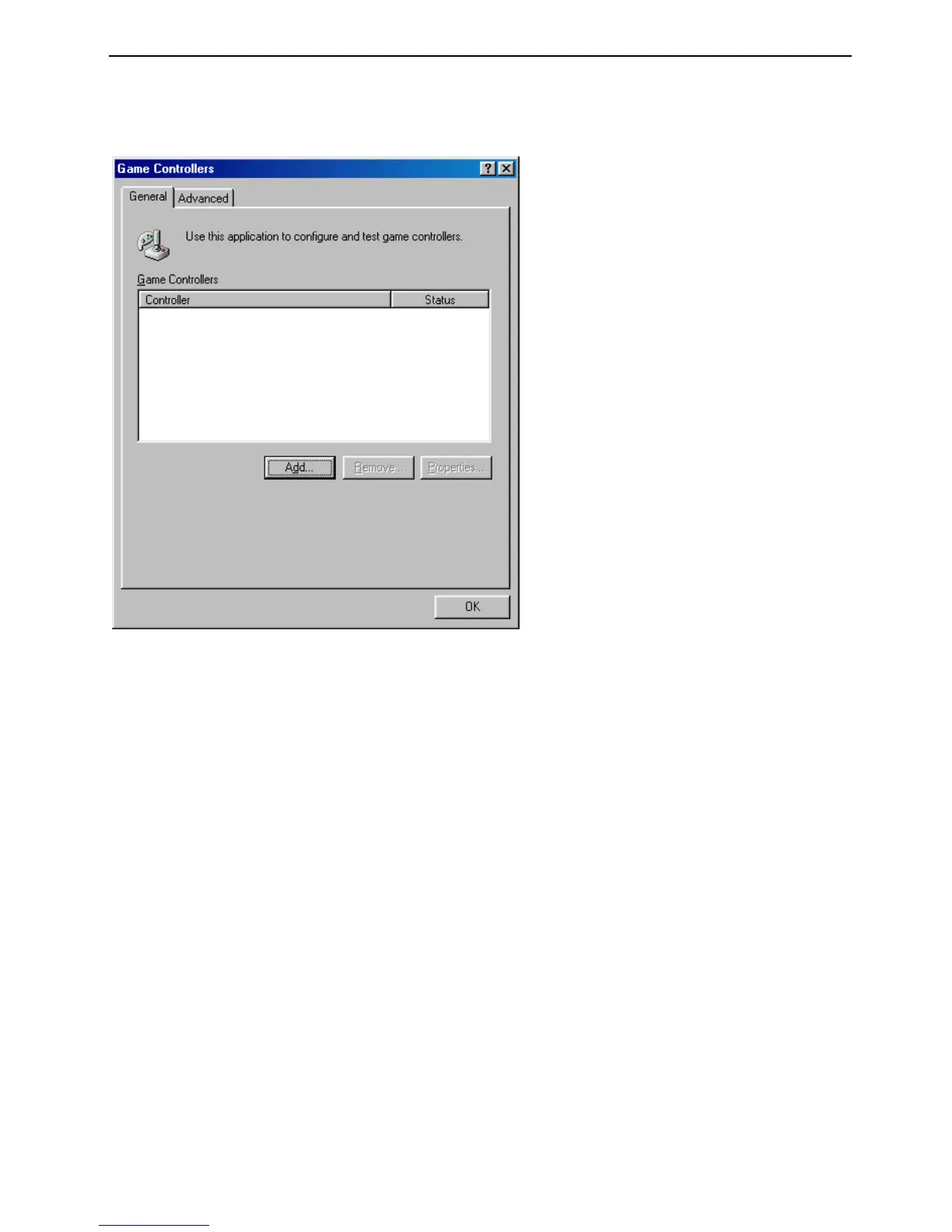
6. Double-click on the ‘Game Controllers’ icon. A screen as illustrated in Figure 2 will
appear.
Figure 2: List of installed joysticks
7. The list should be empty when you start. If this is not the case, click on ‘Remove’ to
empty the list. See figure 2.
8. Click on ‘Add’.
9. From the list, select ‘Joystick with 2 axes and 4 buttons’ and click on ‘OK’.
10. Click on ‘Properties’, and in the next screen, select ‘Calibrate’.
11. Follow the on-screen instructions for calibrating the steering wheel. Refer to figure
5 for the location of the buttons.
12. Click on ‘Test’ to test the Vibration Feedback Rally Master. If the steering wheel
fails to operate correctly, follow the steps once again, or refer to the
Troubleshooting section.
13. Click on ‘Apply’.
14. Your Vibration Feedback Rally Master is now ready for use. Refer to section 4 for
operating instructions.


 To Next Page