7 HOW IT WORKS
CONTROL REFERENCE GUIDECONTROL REFERENCE GUIDE
CONTROL REFERENCE GUIDECONTROL REFERENCE GUIDE
CONTROL REFERENCE GUIDE
Remote ControlRemote Control
Remote ControlRemote Control
Remote Control
1)1)
1)1)
1)
2)2)
2)2)
2)
3)3)
3)3)
3)
4)4)
4)4)
4)
5)5)
5)5)
5)
6)6)
6)6)
6)
7)7)
7)7)
7)
8)8)
8)8)
8)
9)9)
9)9)
9)
10)10)
10)10)
10)
11)11)
11)11)
11)
12)12)
12)12)
12)
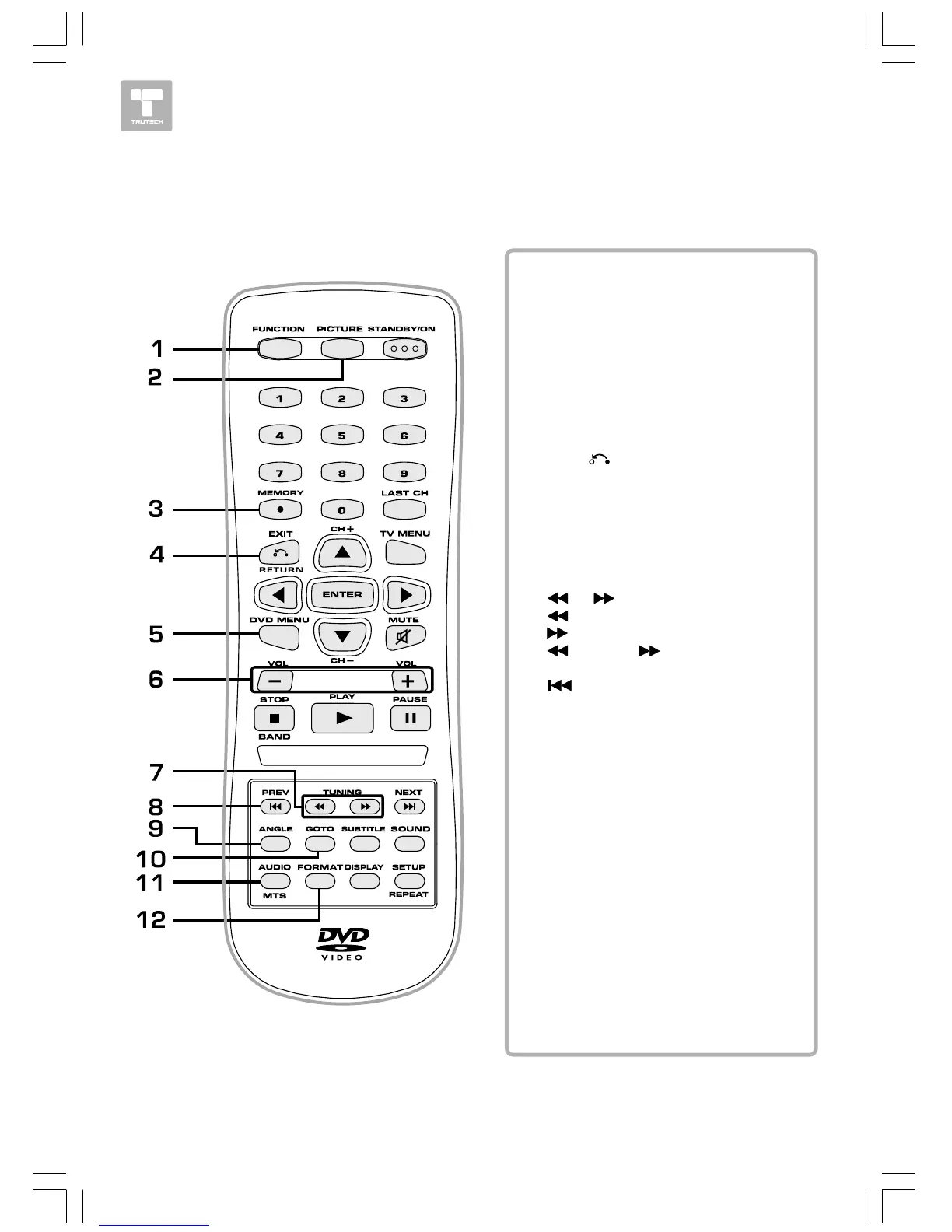
FUNCTION ButtonFUNCTION Button
FUNCTION ButtonFUNCTION Button
FUNCTION Button
Use to select DVD, TV or RADIO
mode.
PICTURE ButtonPICTURE Button
PICTURE ButtonPICTURE Button
PICTURE Button
Selects from preset screen display
settings to match the type of show
you are watching.
MEMORY ButtonMEMORY Button
MEMORY ButtonMEMORY Button
MEMORY Button
Sets title/chapter in a favorite order.
Enter the number of a selected
station.
EXIT EXIT
EXIT EXIT
EXIT
Button Button
Button Button
Button
Press to exit the TV menu and return
directly to normal viewing.
DVD MENU ButtonDVD MENU Button
DVD MENU ButtonDVD MENU Button
DVD MENU Button
Press to enter the main menu of the
DVD you are watching.
VOLUME (+/-) ButtonsVOLUME (+/-) Buttons
VOLUME (+/-) ButtonsVOLUME (+/-) Buttons
VOLUME (+/-) Buttons
Adjusts the volume.
/ /
/ /
/
TUNING Buttons TUNING Buttons
TUNING Buttons TUNING Buttons
TUNING Buttons
: Fast reverse playback.
: :
: :
: Fast forward playback.
TUNING TUNING
TUNING TUNING
TUNING
: :
: :
: Scans all available
radio stations.
PREV Button PREV Button
PREV Button PREV Button
PREV Button
Selects previous titles, chapters or
tracks on a disc.
ANGLE ButtonANGLE Button
ANGLE ButtonANGLE Button
ANGLE Button
During DVD playback, switch the
camera angle of the video
presentation when scenes with
multiple camera angles are recorded
on a DVD.
GOTO ButtonGOTO Button
GOTO ButtonGOTO Button
GOTO Button
Goes directly to a location on a DVD/
CD.
AUDIO ButtonAUDIO Button
AUDIO ButtonAUDIO Button
AUDIO Button
Selects audio soundtracks of a DVD
or change the output mode of a CD.
MTS ButtonMTS Button
MTS ButtonMTS Button
MTS Button
Press to select MONO sound, STEREO
sound or Secondary Audio Program
(SAP).
FORMAFORMA
FORMAFORMA
FORMA
T ButtonT Button
T ButtonT Button
T Button
Press to select the picture format.


 To Next Page