Thanks for purchasing the ENIGMA Digital Mini Scale! This
User Guide is designed to get you up and running quickly
with your scale. Scales are precision instruments and
require proper care and skill to get the best results. If you
have questions or need support, visit us at http://www.
truweigh.com/support or scan the QR Code on the back of
this manual using your smartphone.
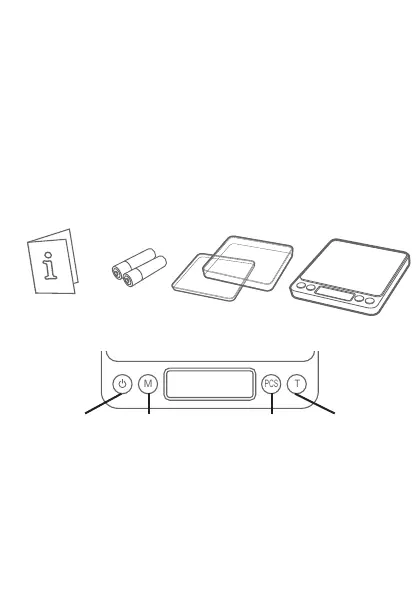
What’s In The Box
Key Descriptions
Radio Frequency
Interference
Unlevel Surfaces High Humidity
Air Currents Vibration Extreme Temps
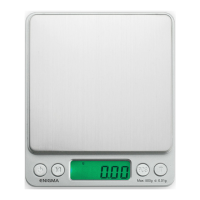
ON/OFF - Turns the scale ON or OFF.
MODE - Changes the weighing unit.
PCS - Enter counting mode. Hold to set sample quantity
for average piece weight calculation.
TARE - Zero’s the scale. Also subtracts the weight of an
empty container (see Tare Function).
ENIGMA Digital
Mini Scale
Two AAA
Batteries
Two Expansion
Trays
User Guide
Radio Frequency
Interference
Unlevel Surfaces High Humidity
Air Currents Vibration Extreme Temps
M
PCS
T
Radio Frequency
Interference
Unlevel Surfaces High Humidity
Air Currents Vibration Extreme Temps
M
PCS
T
Radio Frequency
Interference
Unlevel Surfaces High Humidity
Air Currents Vibration Extreme Temps
M
PCS
T
Radio Frequency
Interference
Unlevel Surfaces High Humidity
Air Currents Vibration Extreme Temps
M
PCS
T
TAREMODE PIECESON/OFF


 To Next Page