TSM Control Systems,
Ard Easmuinn,
Dundalk, Co. Louth, Ireland
Tel: (+353) 42-9335560 Fax: (+353) 42-9334422
Email: info@tsm-controls.com
Website: www.tsm-controls.com
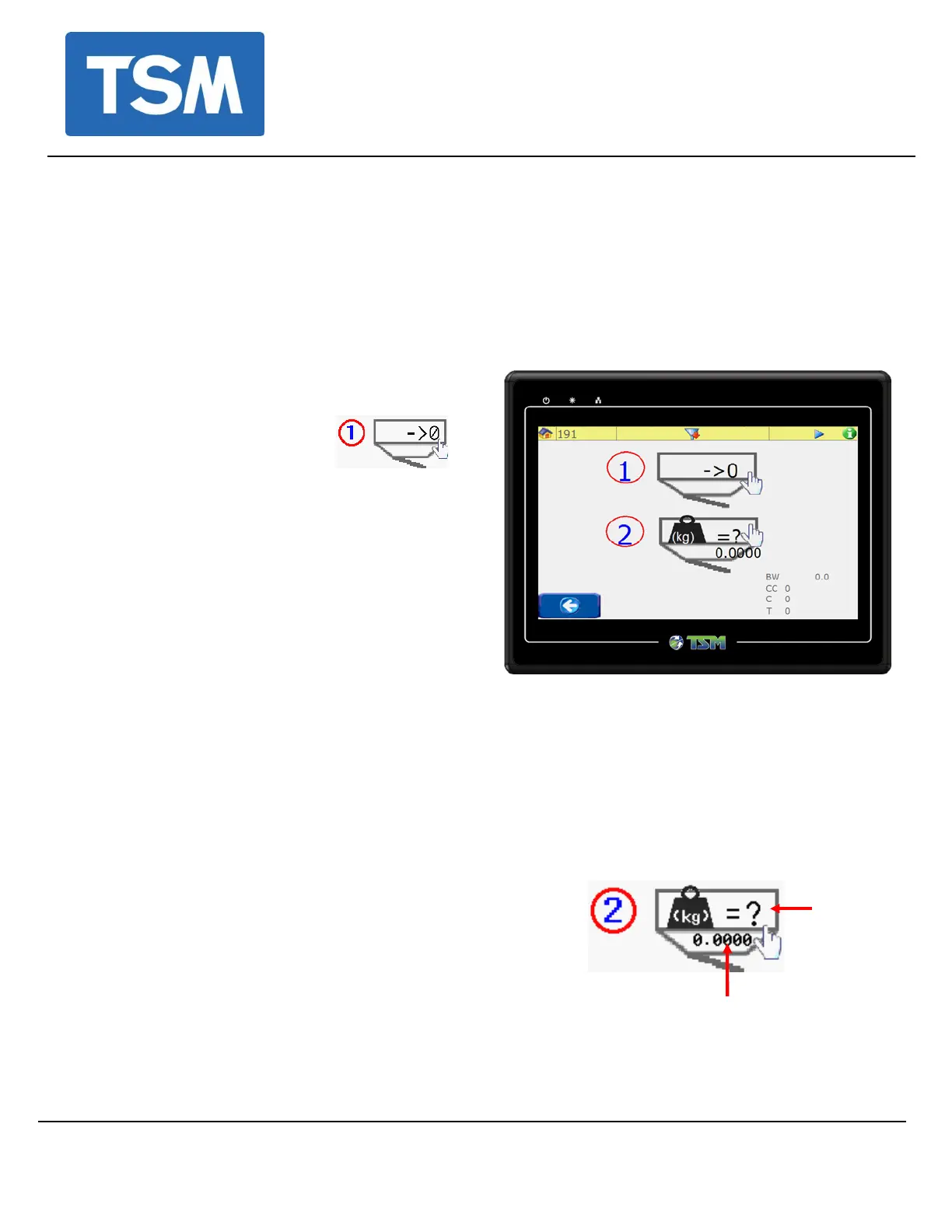
3. Tare the Hopper. (setting the zero point.)
Ensure that the mixing chamber door is open and there is
nothing touching the weight hopper before attempting to tare
the load cell.
With the weigh hopper
empty, allow the weight
reading to stabilize and
then touch
This value now becomes the zero reference
point for the load cell readings.
4. Check Weight Calibration.
Gently slide the weigh hopper out and place a known weight into it (use a weight
close to the batch size)
Touch this icon and if for example if the
calibration weight is 1kg, enter 1 on the
numeric keypad.
(The lower value on this icon is the actual
weight)
• The Blender automatically re-calibrates
itself and the actual weight should now
be displayed correctly.
Doc no TD 107 Rev 1.1
Page 3


 To Next Page
 Loading...