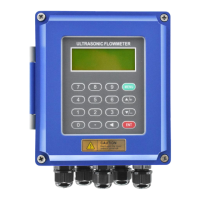
T3-1 series ultrasonic water meter is touch keyboard operation, there are two buttons”
Keyboard mnemonic: left click”
” is down; left-right click”
” is modification ; right-left
Menu
Windows
No. Windows description and functions
M00
Water meter: Display Net cumulative flows and instantaneous flows
Heat meter:Display POS (positive)cumulative heats and instantaneous heats
M01
Display POS cumulative flows and instantaneous flows
(water meter without this Menu)
M02
Display the supply and return water temperature and temperature difference(water meter
without this Menu, unit is only ℃ )
M03
Calendar, first line display date and week; Second line display the hour and minute
M04
First line display two way signal strength,failure error code;Second line display two way
signal quality
M05 Calibration menu
M06 Batch controller (irrigation controller)
T3-1series ultrasonic water meter include 5 kinds of menus: main menu, secondary menu1, secondary menu2, batch control
menu and time-accumulated menu. Under the main menu, you can enter into any menu by the modification key”
” enter into the month cumulative flow;
” enter into secondary menu1 (M10~M19);
Under the M19 of the secondary men1, press “
” enter into secondary menu2 (M20~M2A);
” enter into date cumulative flow;
M05, start-stop method calibration state; press “
” enter into constant-current method calibration state;
” enter into batch control and time-accumulated menu(M30~M3C);
More detailed information of T3-1 series ultrasonic water meter, please refer to the << T3-1 series ultrasonic water meter user
How to modify the unit of measure?
How to modify the decimal point location of the cumulative flow?
How to check whether the water meter work well completely?
How to use the built-in batch controller?
How to modify the communication address?
How to modify the time point of the time-accumulator?
How to modify the infrared communication rates?
How to modify the RS485/M-bus communication rates?


 To Previous Page
 Loading...