1 2 3
Quick Installation Guide
TSOL-RSD-S600/1000/1200/1500-x
Step 1: Assemble the hangers
Assemble the two hangers on the Enclosure.
Step 2: Fix the rapid shutdown control unit
Fix the rapid shutdown control unit on the wall or
the solar bracket. The size of these holes is Φ5 mm.
Warning: The rapid shutdown control unit may not be
installed in direct sunlight.
Warning: Installers should determine the installation
location of rapid shutdown control unit according to local
regulations
Tips: There are no installation screws in the package.
Installer should prepare these screws or expansion bolts
according to the installation environment.
Step 3: Connect the ground cable
Connect the ground cable to the enclosure.
Step 4: Connect the AC cable
Separate the AC connector.
Connect the AC cable. The definition of the port is
shown below:
Port 1(Brown/Red): Live
Port 2(Yellow-Green): Ground
Port 3(Blue/Black): Neutral
Tips: Use AWG 18 (or 1 mm
2
) cable for AC cable.
Warning: Make sure each cable is connected to the right
port.
Assemble the AC connector.
Plug the connector into the AC socket of rapid
shutdown control unit. Then connect the other side
of AC cable to an AC breaker or an AC switch.
Warning: To prevent electrical hazards, make sure the
switch is turned to “OFF” position.
Warning: Installers should determine the installation
location of switch according to local regulations
Tips: There are no AC switch or AC breaker in the package.
Paste the warning label near the switch.

 Need help?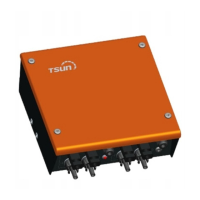

 To Next Page
 General