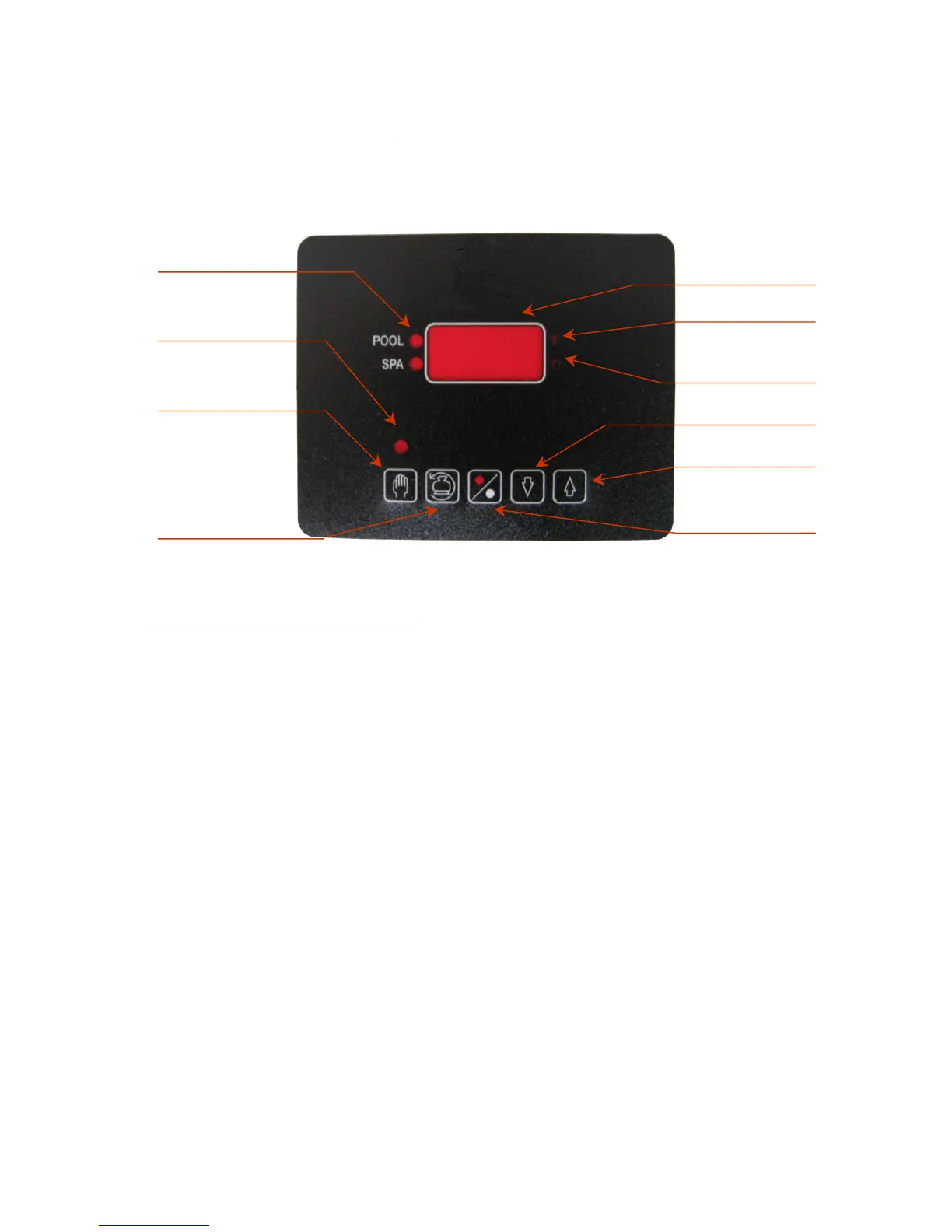
1. INSTRUMENT IDENTIFICATION
HEAT ON LED
POOL or SPA
SET UP MODE LED
SET-UP KEY
BACKWASH KEY
DIGITAL DISPLAY
F DEGREES LED
C DEGREES LED
DECREASE KEY
INCREASE KEY
ON/OFF KEY
2. DESCRIPTION OF FRONT PANEL:
DIGITAL DISPLAY: Display normally shows the actual water temperature.
HEAT ON LED: Indicates that the heat pump is heating the pool or the spa.
°F LED: Indicates that the temperature is being displayed in °F.
°C LED: Indicates that the temperature is being displayed in °C.
SET MODE LED: Indicates the setup or adjustment mode.
ON/OFF KEY [%]: Turns the heat pump ON or OFF.
BACKWASH KEY [BACKWASH]: Hold for 3 seconds to activate the backwash mode.
SET KEY [SET]: Hold for 3 seconds to activate the setup mode.
INCREASE KEY [^]: Increases the desired or setpoint temperature.
DECREASE KEY [v]: Decreases the desired or setpoint temperature.
NOTE: The display may be changed in steps by pushing the [^] or [v] keys briefly, or automatically by holding down
the same key.
19


 To Next Page