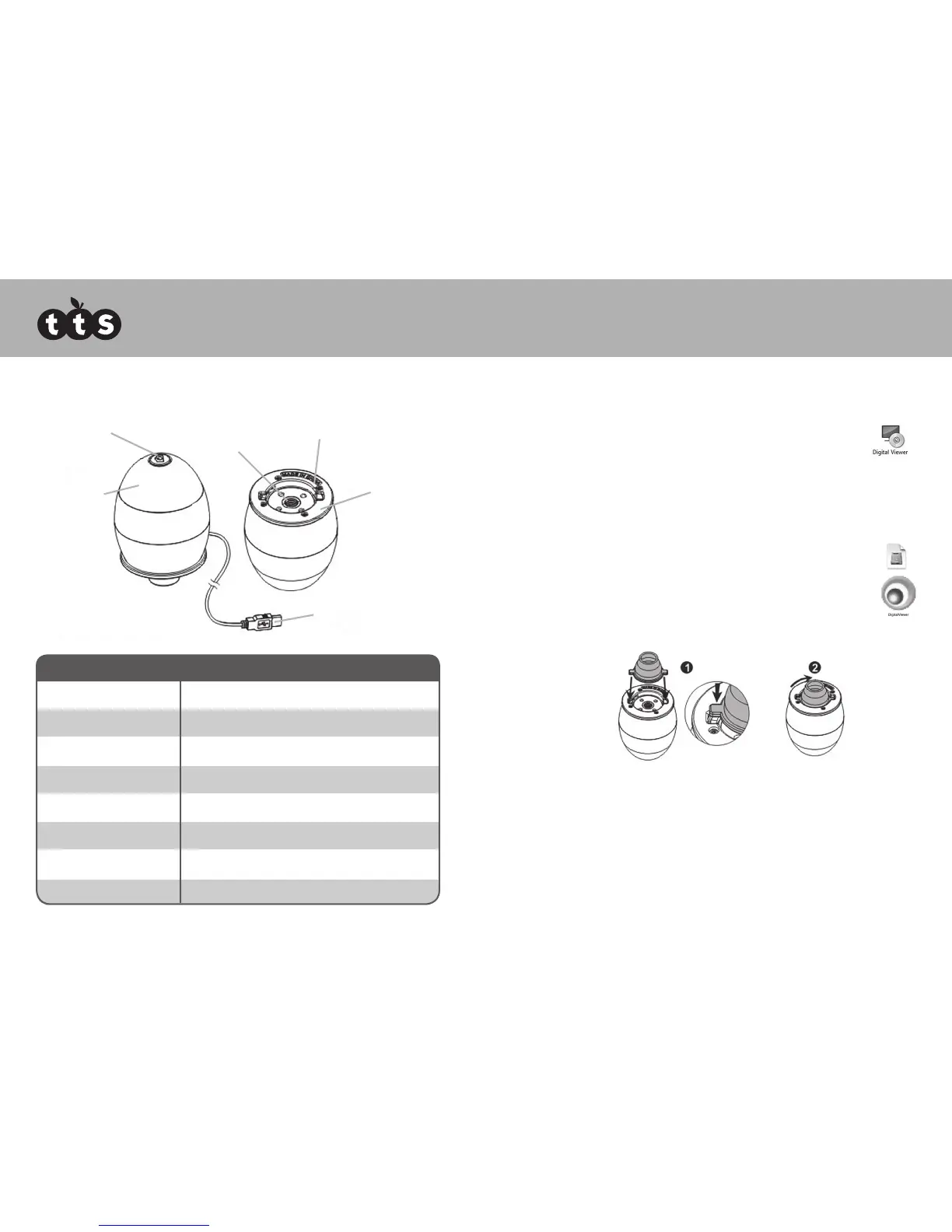
Product overview
Software installation
Windows based PC
1. Insert the supplied application CD to the CD-ROM of the computer.
2. Double click the “Digital Viewer.exe” icon located within the CD.
3. Follow the Digital Viewer setup wizard to install the software and drivers
for the Digital Microscope.
Mac OS based PC
1. Insert the supplied application CD to the CD-ROM of the computer.
2. Double click the “Digital Viewer.dmg” icon located within the CD.
3. Drag the Digital Viewer icon into the Applications folder.
Getting started
Assembling the product
Insert one of the adaptors into the adaptor slot, and fasten it by turning it gently
in the clockwise direction.
Connecting the device
Connect the device to a USB socket of the computer.
Product specification
Connection type USB 2.0
Effective magnification 14” monitor - 34x 17” monitor - 41x
Effective viewing area 8mm x 6mm
Illumination Four LED array
Sensor CMOS
Sensor resolution 680 x 480 pixels (VGA)
Size 75mm x 50mm x 50mm
Weight 133 grams
Lens
Focusing
Ring
LED Lights
Adaptor Slot
USB Cable
Shutter Button
Easi-Scope
4 5



 To Next Page