3
3. Auto Shoot:
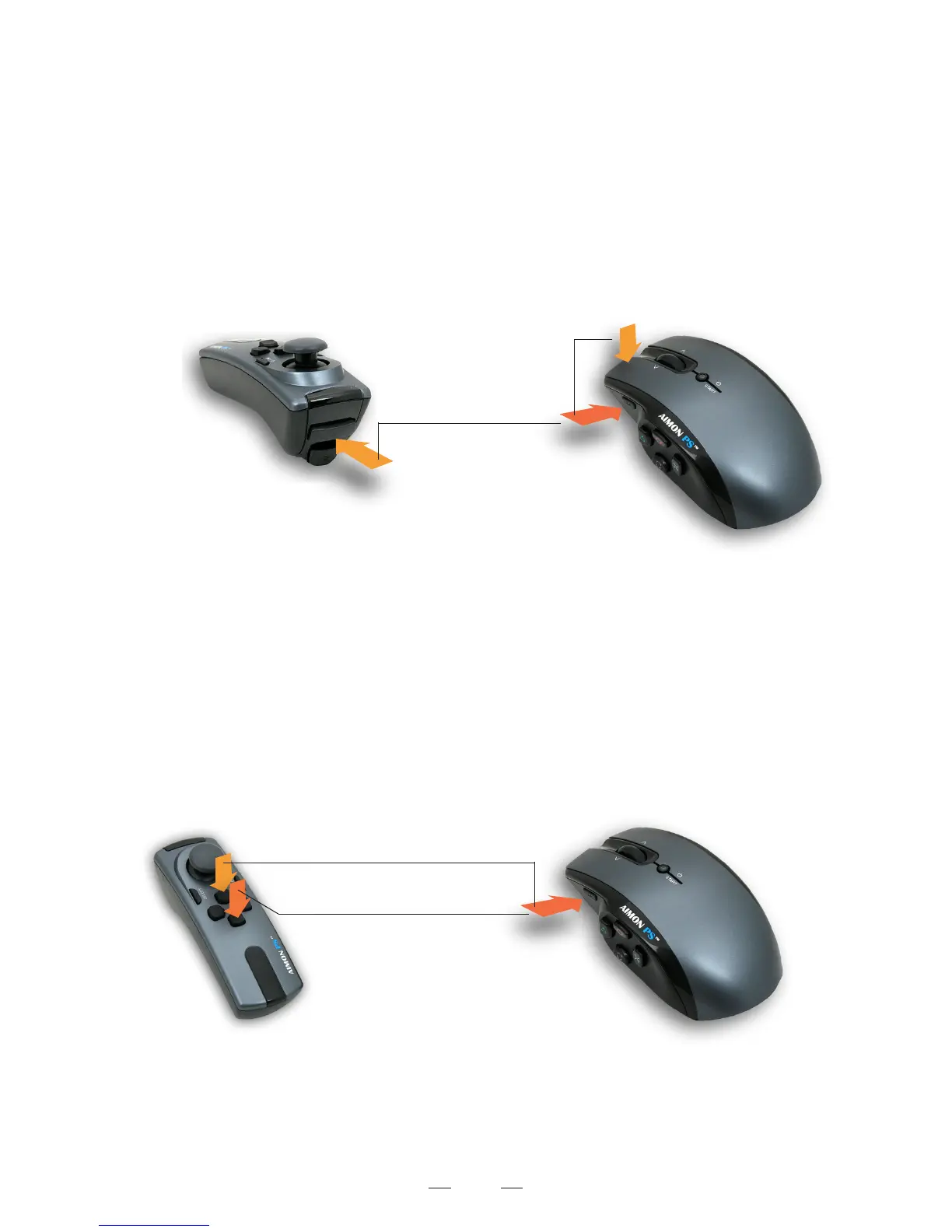
Press and hold the mouse left key (R1) for rapid fire. The rate of rapid-fire speed can be adjusted with our Setup software.
This feature can be turned on and off by pressing and holding the mouse F button and then press R1.
4. Sniper Lock:
Some games require you to press and hold the L1 to maintain aim. The AIMON PS has a Sniper mode that will keep
the aim pressed without holding the L1. When Sniper Mode is enabled, press the L1 to keep aim on and press L1
again to exit continuous aim. To turn on or off Sniper Mode, press and hold mouse F while pressing L1.
Auto Shot On/OffSniper Lock On/Off
Press and Hold The F button
Sniper On/Off
Auto Shot On/Off
5. Aim Down Sight Panning Speed:
When you turn on your aiming sight, you can adjust the panning speed, press and hold the F while pressing D-Pad Up
to increase the speed, press and hold the F while pressing D-Pad Down to decrease the speed.
Each Dpad Up press would get +10% of the orignal speed, you can get up to 250% of the orignal speed.
Aim Down Sight Panning Speed
Press and Hold The F button
Increase the Aim Down Sight Panning Speed
Decrease the Aim Down Sight Panning Speed


 To Next Page