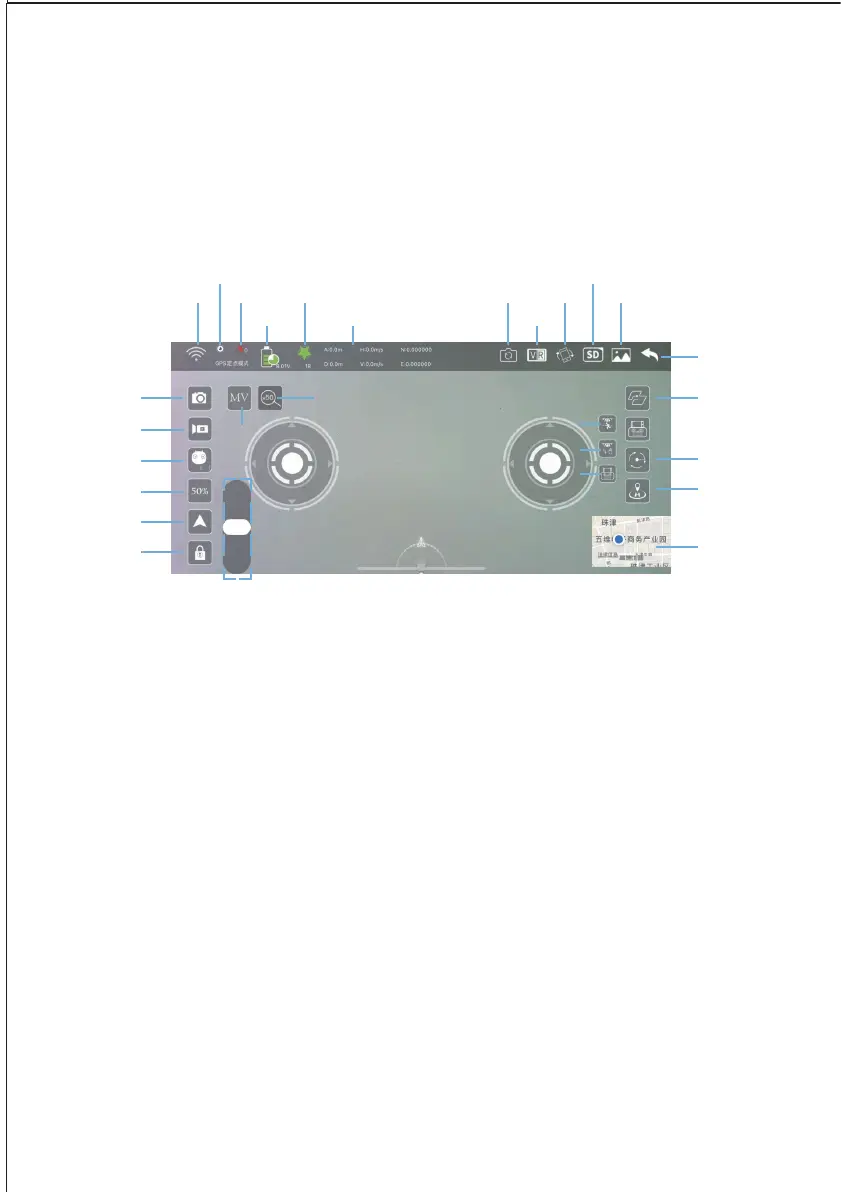
Take photo
Start Video
Phone Joysticks
Speed
Take-off/ Land
Start Motors
Wi-Fi
Optical /GPS Mode
Battery GPS VR
HD Mode/ SD Mode
Satellite Geomagnetic Interference Flip Camera Rotate Album
Back
Indoor Follow me
50zoom
MV
Gesture control
Controller Follow Me
Tap Fly/Waypoint Flight
Cicle-Me
Return To Home
Map View
Camera Tilt UP/Down
1.XiL Pro APP has 2 flight modes, HD mode and SD mode,
the default is SD mode.(In HD Mode, take photos 4K stored
in the phone)
2.You can now enter the main flight interface. Wait for
drone to connect to 8+ satellites before attempting to take
off. Here is a reference diagram of all the buttons/icons in
the flight interface.


 To Next Page