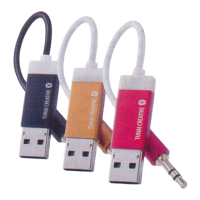
Connection
Turn on the Bluetooth on your device and search for
"TUNAI FIREFLY". Click on "TUNAI FIREFLY" when
searched and wait for 5 to 10 seconds to connect.
Play Music
You can now stream music from any APP on your device
except for phone calls.
Help and Resources
DOWNLOAD THE USER MANUAL
To learn more about FIREFLY, download the User Manual
at tunai-creative.com/downloads
TUTORIAL VIDEOS
Watch how-to tutorials on making the most of your
FIREFLY products at https://goo.gl/p2RIBN
CUSTOMER SUPPORT
Need help? Want more info? Find answers to commonly
asked questions at tunai-creative.com/supports.
Contact Customer Support at
tunaiitunai-creative.com
WARRANTY
TUNAI provide a 1-year limited warranty against materials
and workmanship under ordinary consumer use for one
year from the date of orginal retail purchase.
REGULATORY INFORMATION
-.........-
English


 To Next Page
 Loading...