84 85
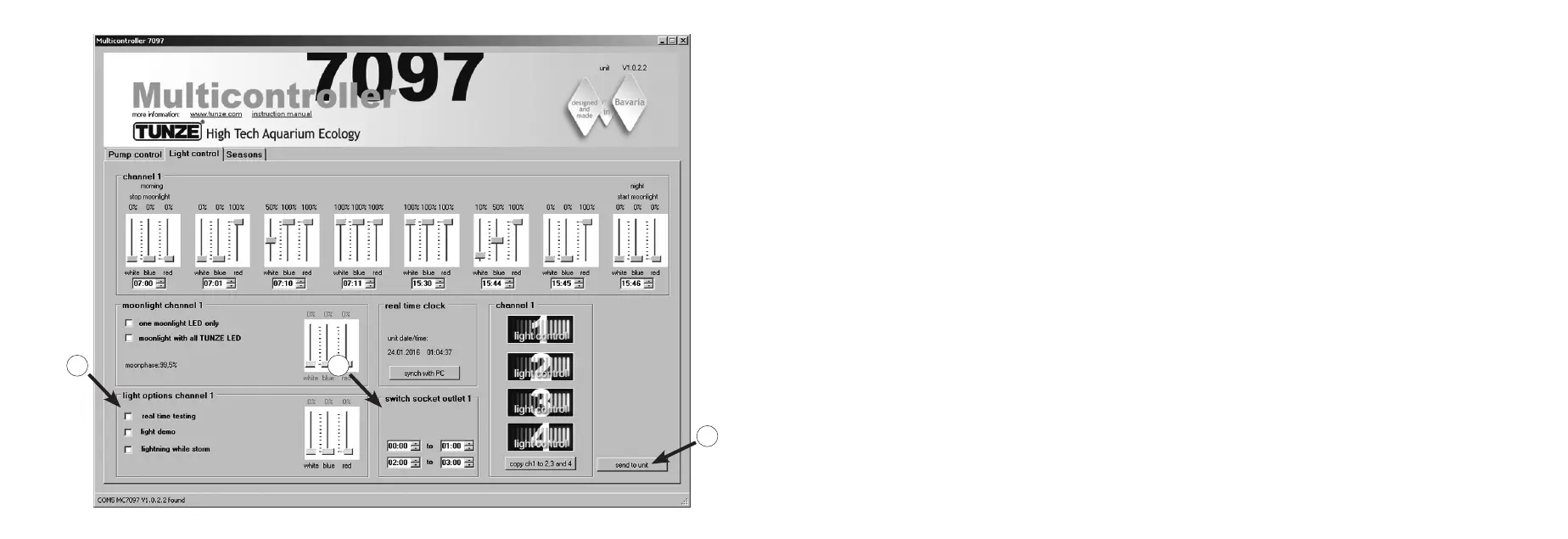
Field “light options channel...” (5)
In this eld, there are three major options for the TUNZE
®
LED:
“real time testing“ allows a check of all three LED colors separately, without the conrmation “send to unit“.
“light demo“ simulates the dimming and brightening of the selected TUNZE
®
LED as a demonstration routine.
“lighting while storm“ allows a lightning simulation, as soon as the „storm cycle“ for the desedimentation has been
switched on at “Pump control“.
Field “switched socket outlet…” (6)
In this eld, a TUNZE
®
switching socket 7097.120 can be programmed for conventional aquarium lamps.
Send to unit (7)
Computer settings are sent to the Multicontroller.
5
6
7


 To Next Page