82 83
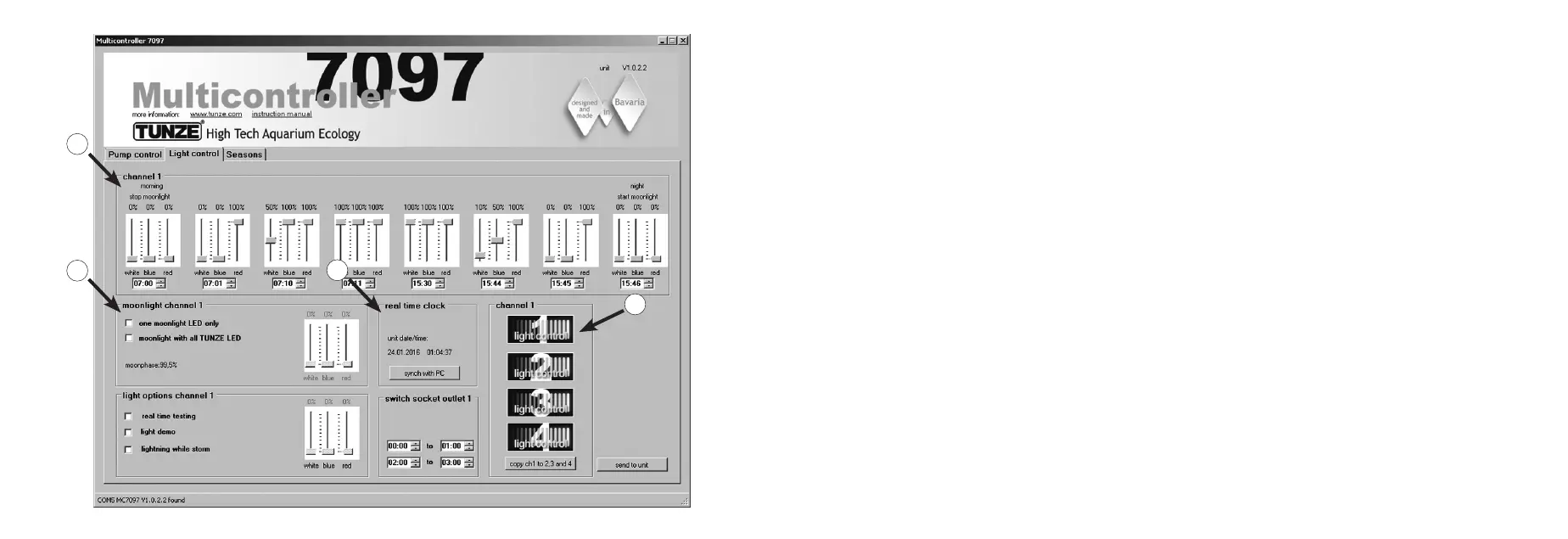
Short description of the display
“Light control“ – for the TUNZE
®
LED
Field “channel 1, 2, 3, 4” (1)
In this eld, the light channel can be selected with a simple click on the icons, which will also be signaled in the box
on the upper left.
“copy ch1 to 2, 3 and 4“ copies the basic settings from channel 1 to the three other channels.
Field “channel“ (2)
This eld is used to set the performance and light colors, as well as the time base of the TUNZE
®
LED.
Field “moonlight channel...“ (3)
In this eld, it is possible to congure the TUNZE
®
LED as moonlight.
Field “real time clock“ (4)
In this eld, the Multicontroller 7097 is synchronized with time in the computer.
4
3
2
1


 To Next Page