114 115
“night mode“
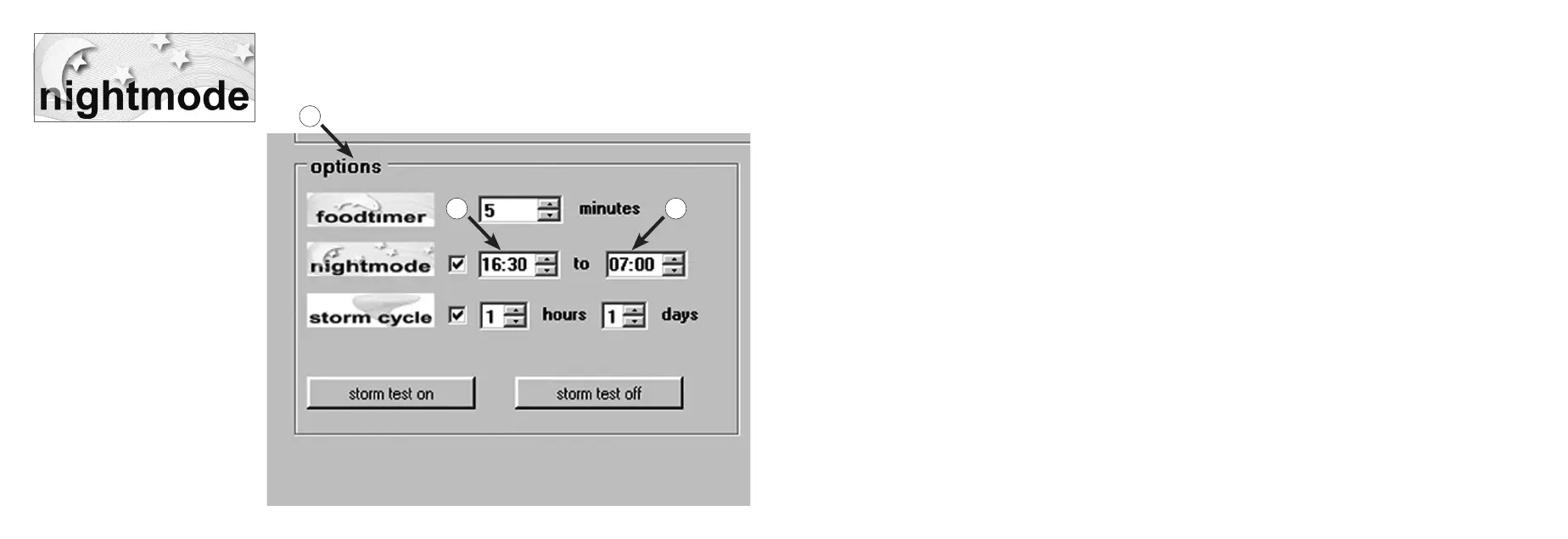
This function is adjustable in the eld “options“ (1).
Time window for the night mode can be set by clicking on (2) and (3) hours. The internal real time clock will interrupt
the pulse operation of the connected pumps during this time. The pumps will then continue to run with the “low power“
performance. In the morning, after the time has expired, the selected pulse operation of the pump will start again. The
night mode is possible for every current ow program of the Multicontroller 7097.
The internal real time clock is permanently displayed during the “night mode“ function. The time in the Multicontroller
can be synchronized with the computer under “Light control“ in the eld “real time clock“.
3
2
1


 To Next Page