Need help?
Do you have a question about the Turbo Air TOM-40 and is the answer not in the manual?
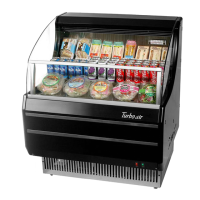
Details model dimensions, electrical, compressor, refrigerant, lighting, control, defrost, and weight.
Instructions for checking the unit for damage upon arrival and reporting any issues.
Guidance on optimal placement, ambient conditions, and leveling the display unit for proper function.
Explains the location and function of the light switch and temperature control.
Advice on how to place products to ensure proper airflow and cooling performance.
Step-by-step instructions for safely cleaning the condenser coil monthly.
Checklist for troubleshooting when the display unit is not functioning correctly.
Steps to diagnose and resolve issues causing the display case to be warm.
Troubleshooting guide for when the unit's internal lights are not operational.
Details on how to make a warranty claim, including required information.
Covers cabinet and parts defects for one year from installation or 15 months from shipment.
Extended warranty for the hermetically sealed compressor for four additional years.
Procedures to follow to ensure the four-year compressor warranty remains valid.
Specifies what is not covered by the warranty, including consequential damages and improper usage.
 General
| Type | Merchandiser |
|---|---|
| Model | TOM-40 |
| Brand | Turbo Air |
| Lighting | LED |
| Energy Efficiency | Energy Star Certified |
| Voltage | 115V |
| Horsepower | 1/3 HP |
| Defrost Type | Automatic |
| Temperature Range | 33°F - 38°F |
| Door Type | Swing |

 To Next Page