
 Need help?
Do you have a question about the Turnigy Fabrikator II mini and is the answer not in the manual?
Lists included items and illustrates key printer components and their locations.
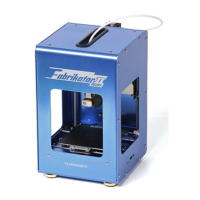
Details printer capabilities, dimensions, supported files, and system requirements.
Connects the power line and Micro USB cable to the printer.
Installs Repetier-Host software and configures printer, extruder, and shape settings.
Configures the CuraEngine slicer within Repetier-Host for optimal slicing.
Establishes a connection between the configured software and the 3D printer.
Adjusts and calibrates the print bed for proper first layer adhesion.
Installs and loads filament into the extruder for printing.
Installs the Malyan Link software and virtual comport for network connectivity.
Configures the printer's Wi-Fi connection using SSID and password.
Accesses and controls the printer via a web browser interface using its IP address.
Prints models directly from a PC using the USB connection.
Saves sliced G-code to an SD card for printing without a PC.
Explains the functions of the printer's control button for print management and Wi-Fi setup.
Addresses common problems like nozzle blockages, software timeouts, and print quality issues.
Covers cleaning, lubrication, calibration checks, and environmental recommendations.
 General
| Product | FDM Desktop 3D Printer |
|---|---|
| Usage | Rapid Prototyping, print 3D models, samples, parts, toys. |
| Construction | Aluminum |
| Filaments | 1.75mm diameter PLA |
| Build Surface | Heating bed with PEI coating |
| Certificate | CE, ROHS, FCC, ISO 9001:2008 |
| Warranty | 6 months |
| Extruder | Single |
| Nozzle diameter | 0.4 mm (0.015 in) |
| Positioning Precision | XY 11 microns (0.0004 in), Z 2.5 micron (0.0001 in) |
| Layer Resolution | 100 micron (0.0039 in) |
| Nozzle heating | Max 250℃ |
| Build Volume | 100x100x100 mm |
| Input Power | 100-240V, Max:80W |
| Interface | Memory card, USB and wireless network |
| Supported File | STL, OBJ/G-Code |
 Weight and Dimensions
| Product Dimension | About 17.2x18.3x27 cm |
|---|---|
| Shipping Box | About 220x220x320 mm |

 To Next Page