EasyManua.ls Logo

Turtle Beach ATOM - User Manual

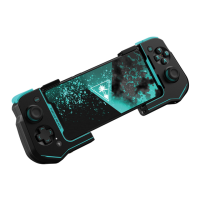
Turtle Beach ATOM
16 pages
Print Icon
To Next Page IconTo Next Page
Loading...
QUICK-START GUIDE
GUIDE DE DÉMARRAGE RAPIDE
IMPORTANT: READ BEFORE USING
ANY QUESTIONS? TURTLEBEACH.COM/SUPPORT
IMPORTANT À LIRE AVANT UTILISATION
DES QUESTIONS? TURTLEBEACH.COM/SUPPORT
宄宗宒宐季宦宲宱宷宵宲宯宯宨宵
Question and Answer IconNeed help?

Do you have a question about the Turtle Beach ATOM and is the answer not in the manual?

Turtle Beach ATOM Specifications

General IconGeneral
ConnectivityBluetooth
Battery Life20 hours
ChargingUSB-C
Analog Sticks2
CompatibilityAndroid
ColorBlack/Yellow
D-Pad1
ButtonsStandard controller buttons

Summary

Quick-Start Guide

Controller Controls

Attaching Smartphone

Powering Atom On;Off

Bluetooth Setup and Pairing

Charging the Atom Controller

LED Indications for Charging

Details LED status indicators for charging and general controller status.

Mobile App and Support

Regulatory Compliance Statements

Local Restrictions on Radio Usage

Information on country-specific radio usage and frequency settings for wireless devices.

Federal Communications Commission (FCC) Compliance

FCC statements, including non-modification, interference, and exposure warnings.

RF Radiation Exposure & Hazard Warning

Details on RF radiation exposure limits and safe usage practices.

Canadian Regulatory Compliance

ISED Compliance Notices

Statements from Innovation, Science and Economic Development Canada.

Canadian ICES Statements

Industry Canada's licence-exempt RSSs compliance information.

RF Radiation Exposure & Hazard Statement

Specific RF exposure limits and hazard information for Canada.

European and EFTA Regulatory Compliance

Related product manuals