CONTROLS
COMMANDES
A
BX
Y
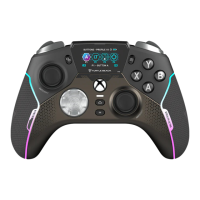
MIC MONITORING
Alters the level of your voice
in your headset on Xbox
VOLUME
Alters the volume on Xbox
MODE
Cycles features on the vitals dashboard
XBOX CONTROLS
Focus your View, Share your game
content and access Menus on Xbox
RIGHT ACTION BUTTON
PRO-AIM™, or map to any button
LEFT ACTION BUTTON
Map to any button
3.5 MM HEADSET CONNECTION
(only active in wired mode)
USB-C CABLE PORT
For charging and connection to Xbox or PC
SUPERHUMAN HEARING
Pinpoint quiet audio cues like enemy
footsteps and weapon reloads
PRO-AIM™ FOCUS MODE
Set your right-stick sensitivity level
CHAT
Alters the level of game and chat audio on Xbox
SELECT
Cycles options for each feature
XBOX BUTTON
Open guide on Xbox and access Game bar on
Windows 10/11
MIC MUTE
Toggle your Mic status on Xbox
BUTTON MAPPING
Map Buttons and select profiles
FEATURE LEVEL
Indicates the active feature option
EQ
Tune your game audio
PAIRING BUTTON
Connect to Android
®
smart devices for mobile gaming
MODE SWITCH
Switch between wired and wireless
communication
CLIP MOUNT
Mount the mobile phone clip here



 To Next Page