Need help?
Do you have a question about the Turtle Beach VELOCITYONE FLIGHT and is the answer not in the manual?
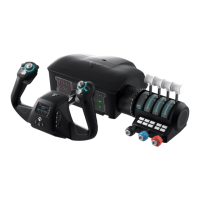
Details the main physical parts including the Yoke, Throttle Quadrant, and accessories.
Explains the functions of buttons, trim wheel, rotational levers, and TPM linear levers.
Covers the Flight Management Display and headset connection.
Includes custom handles, SIP inserts, and desk clamps for setup.
Detailed breakdown of each control component and its primary function.
Instructions on how to physically connect the throttle quadrant to the yoke base.
Procedure for attaching the controller to a surface using integrated desk clamps.
Instructions for using micro-suction tape when desk clamps cannot be used.
Guides on connecting USB-A to USB-C and USB-C to USB-C cables.
Instructions for connecting a 3.5mm headset for use on Xbox and PC.
Details on applying micro suction tape for securing the controller to a surface.
Instructions for removing and attaching different throttle lever handles.
Using yoke controls to navigate the Xbox system menus.
Introduction to the FMD for configuring system settings on the fly.
Choosing an active profile in Microsoft Flight Simulator.
Checking input and control assignments within the training mode.
Displaying and manually setting flight time data.
Using FMD buttons to set local time, hours, minutes, and timer functions.
Adjusting LED color, brightness, SIP mode, and chronometer settings.
Using magnetic SIP inserts and matching them to SIP Mode options.
Instructions for peeling and applying decals to buttons or SIP inserts.
Mapping flight controls to specific assignments for custom profiles.
Statements regarding FCC Class B digital device compliance and Canadian regulations.
CE marking and applicable standards for European Union and EFTA regions.
Guidelines on WEEE directive, REACH, and proper product disposal.
 General
| Type | Flight Control System |
|---|---|
| Yoke Rotation | 180 degrees |
| Integrated Display | Yes |
| Connectivity | Wired |
| Connection | USB |
| Customizable Controls | Yes |
| Compatibility | Xbox Series X|S, Xbox One, PC |
| Rudder Control | Integrated |
| Display | Full color integrated display |

 To Next Page