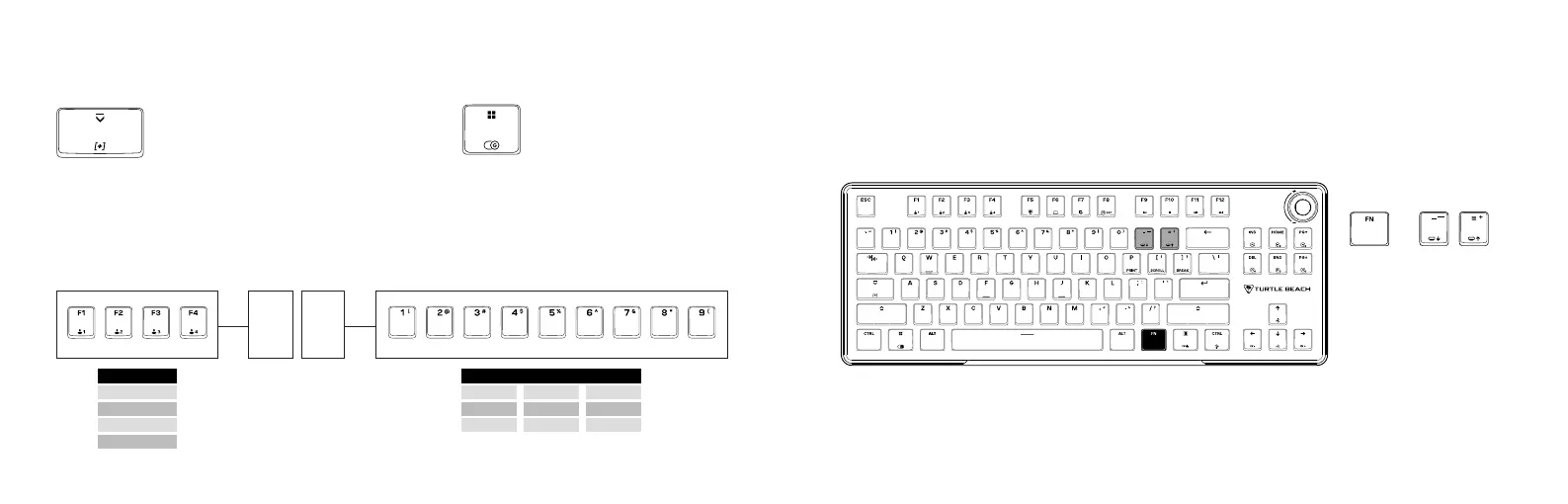
Caps Lock: The light will breathe white when
caps lock is pressed
Verr. Maj. : La lumière clignote en blanc lorsque
la touche Verr Maj est enfoncée
Actuation Point: The lights will breathe white to indicate the set actuation distance
Point d‘activation : Les lumières clignotent en blanc pour indiquer le point d‘activation défini
Game Mode: Windows key light will
breathe white
Mode de Jeu : Le voyant de la touche
Windows clignote en blanc
Easy-Shift [+]™: The light will breathe blue when
Easy-Shift[+]™ is activated
Easy-Shift [+]™ : La lumière clignote en bleu lorsque la
fonction Easy-Shift[+]™ est activée
LED INDICATION | INDICATION LED HALLEFFECT FUNCTIONALITY
SYSTÈME À EFFET HALL
2 = 0.2 mm
5 = 0.5 mm 8 = 0.8 mm
1 = 0.1 mm
4 = 0.4 mm 7 = 0.7 mm
3 = 0.3 mm
6 = 0.6 mm 9 = 0.9 mm
UNITS | UNITÉS
PRESS TO ADJUST
APPUYEZ POUR AJUSTER
+
On-Board Actuation Setting: 40 preset heights, refer to FN functionality
Réglage de l‘activation depuis le clavier : 40 préconfigurations, voir les fonctionnalités FN
Download the Swarm™ II software to utilize more functions like Rapid Trigger, Analog-Input & Multi-Input
Téléchargez Swarm™ II pour plus de fonctionalités comme le “Rapid Trigger“, l‘entrée analogique et le multi-entrée
F2 = 2.0 mm
F4 = 4.0 mm
F1 = 1.0 mm
F3 = 3.0 mm
TENS | DIZAINES
ACTUATION DISTANCE
POINT D‘ACTIVATION
2 .1



 To Next Page