www.tury.com.br
6
2.5 MAGICKEY LOW BATTERY WARNING
If the MagicKey battery is at a low level the FAST MAX application will indicate on the home screen a
notification alerting you. In this case just change the battery according to item 3.2 of this installation manual.
2.4 REGISTRATION OF COURTESY TIME
The courtesy time set in the Application, indicates how long the vehicle will have the electronic accelerator
locked after starting the vehicle, if MagicKey is turned off or not present.
After this time, and you should not turn off the vehicle, step on the gas or open the vehicle doors, the lock will be c
automatically deactivated allowing the driver to use the vehicle normally. This time must be programmed in the
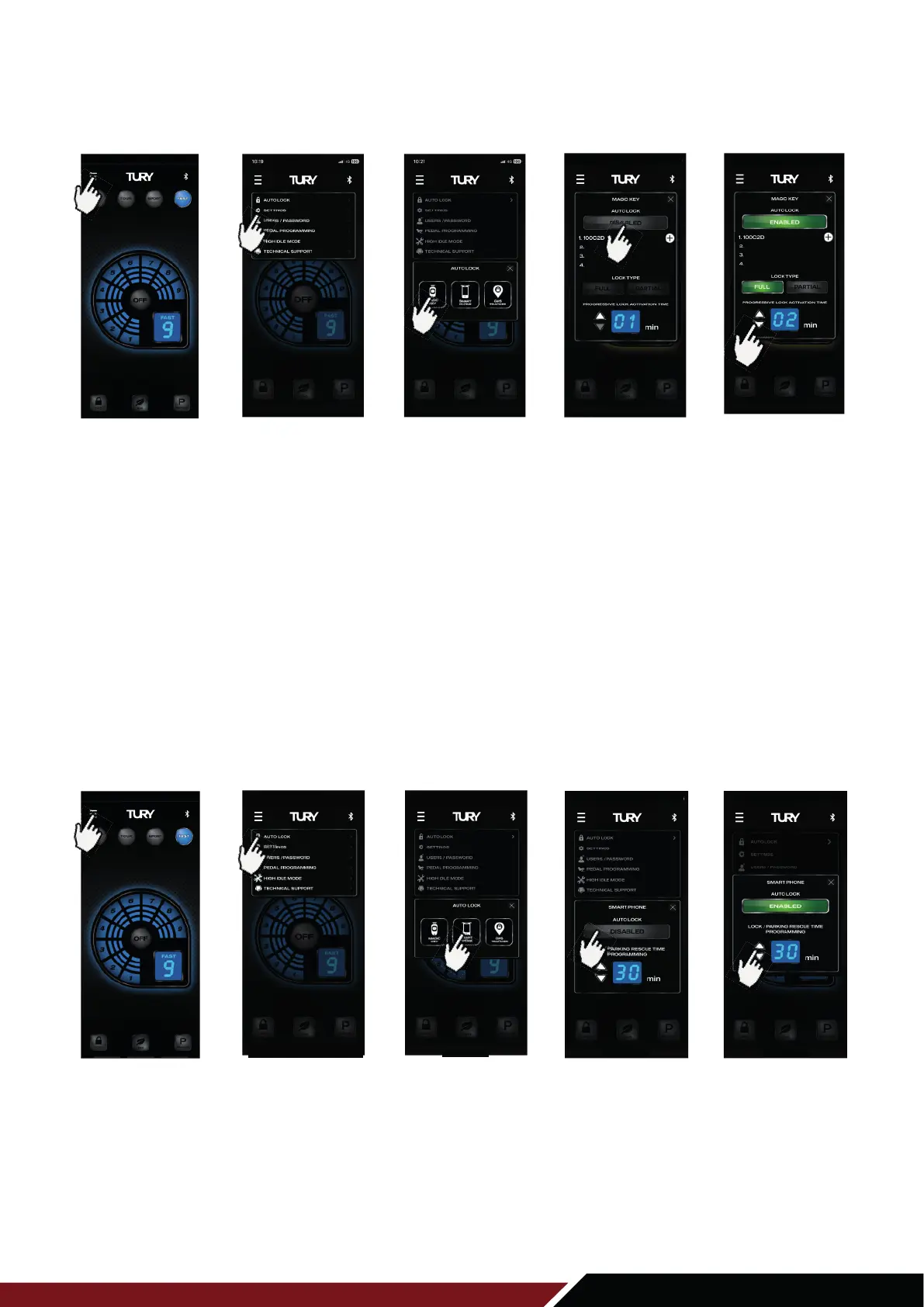
AUTO LOCK module, but inside the SMARTPHONE screen, according to the image below:
1º Open the FAST MAX App and from the main screen press the MENU key on the upper left side;
2º Choose the AUTO LOCK option to expand the 3 functions in this category (Magic Key, Smart Phone, and GPS Tracker);
3º Select the SMART PHONE option;
4º Click on the DISABLED switch to activate the AUTO LOCK function.
5º Click on the UP or DOWN switch, to increase or decrease the time.
1ST STEP
2ND STEP 3RD STEP
5TH STEP4TH STEP
Click to activate
the function
Click on MENU Click on
AUTO LOCK
Clique on
SMART PHONE
Click on UP or
DOWN switch
Click on MENU
1ST STEP 2ND STEP 3RD STEP 4TH STEP 5TH STEP
Click on
AUTO LOCK
Click on
MAGIC KEY
Click to activate
the function
Click on UP or
DOWN switch



 To Next Page