www.tury.com.br
5
2.3 REGISTRATION OF THE PROGRESSIVE LOCK START TIME
After registering the MagicKey (ID) in the FAST MAX application, the user must set the time for the
progressive lock to start. This time can be set between 1 and 20 minutes. This is the time that FAST MAX
will take to start the progressive lock, when it no longer recognizes the presence of the MagicKey, such
as in a burglary situation. Each user can program as he or she wishes. It is the indicated time for the lock
to start after a safe time for the owner of the vehicle to no longer be near the vehicle. Progressive lock
means that the FAST MAX will not be locked immediately after starting the lock.
The progressive lock starts by reducing the electronic accelerator signal by 50%, and every 10
seconds it reduces it by another 10%. After 60 seconds the vehicle will be locked completely or partially,
according to what the user sets in the app.
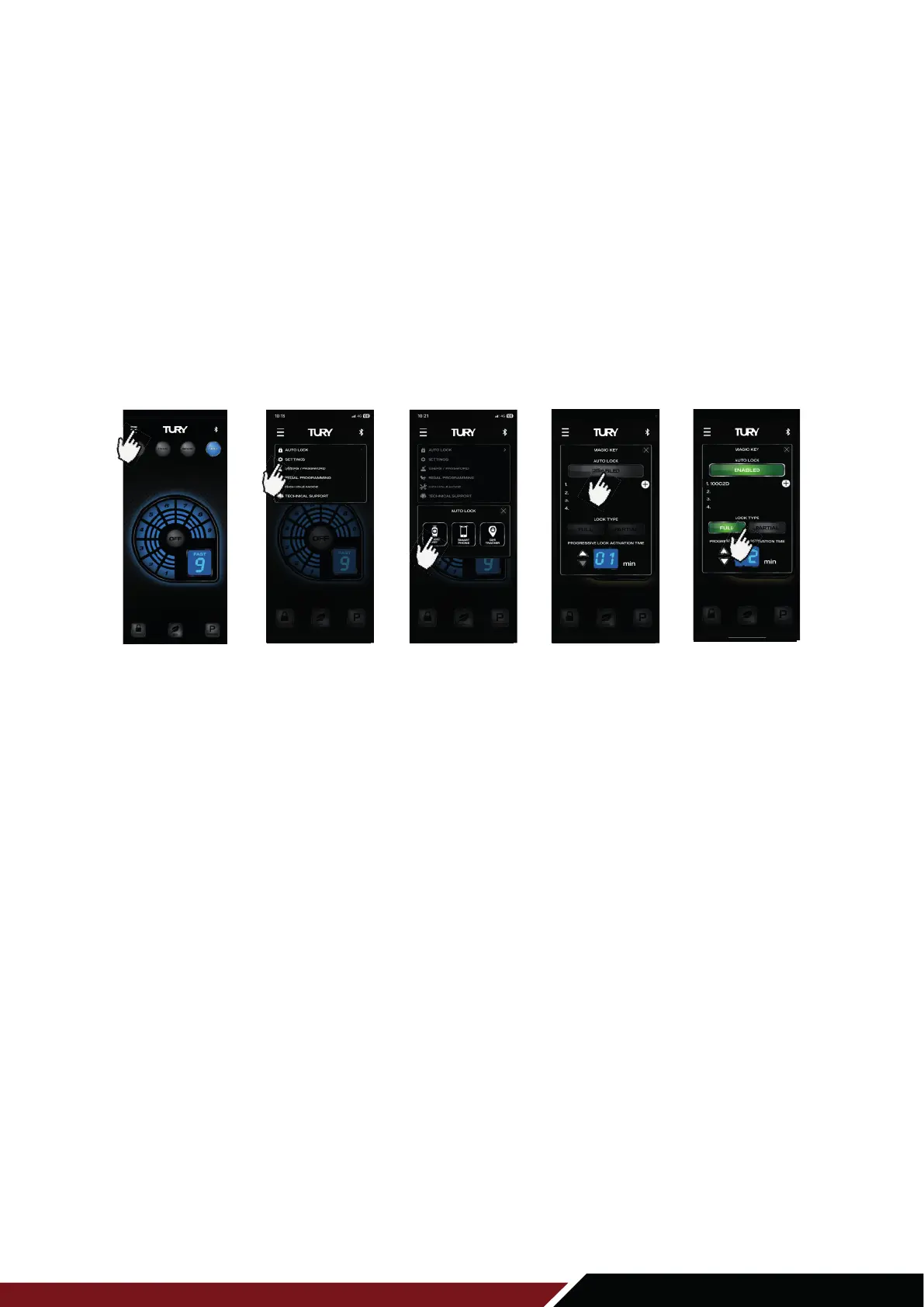
1º Open the FAST MAX App and from the main screen press the MENU key on the upper left side;
2º Choose the AUTO LOCK option to expand the 3 functions in this category (Magic Key, Smart Phone, and GPS Tracker);
3º
Select the MAGIC KEY option;
4º Click on the DISABLED switch to activate the AUTO LOCK function.
5º Click on the UP or DOWN switch, to increase or decrease the time.
Note: The time to start the progressive electronic accelerator lock comes with a factory default of
2 minutes, and is configurable from 1 to 20 minutes.
2.2 ENDLOCK TYPE PARAMETER
You can program the way the final accelerator lock will be done, after 60 seconds of progressive lock.
You can select 100% lock (TOTAL) or 90% lock (PARTIAL). This programming must be done according
to the screen below:
1º Open the FAST MAX App and from the main screen press the MENU key on the upper left side;
2º Choose the AUTO LOCK option to expand the 3 functions in this category (Magic Key, Smart Phone, and GPS Tracker);
3º
Select the MAGIC KEY option;
4º Click the DISACTIVATED switch to activate the AUTO LOCK function;
5º Click on the TOTAL switch to set the total lock type (complete pedal lock) or on the
PARTICULAR switch to set the partial lock type (maintains a minimum acceleration on the pedal).
Click on MENU
1ST STEP 2ND STEP 3RD STEP 4TH STEP 5TH STEP
Click on
AUTO LOCK
Click on
MAGIC KEY
Click to activate
the function
Click on TOTAL or
PARTIAL switch



 To Next Page
 Loading...