The Tuttnauer Auto-reader Incubator is designed for the incubation and automatic readout of Self-Contained Biological Indicators (SCBIs). This device facilitates the easy and rapid detection of positive and negative Biological Indicators (BIs), which are used to monitor sterilization processes. The microorganisms within the BIs vary depending on the sterilization method, requiring different incubation temperatures. For Ethylene Oxide (EO) sterilization control, BIs should be incubated at 37 °C, while BIs for other sterilization processes require incubation at 60 °C.
Function Description:
The auto-reader offers six incubation programs: 4 hours at 37 °C, and 3 hours, 2 hours, 1 hour, 30 minutes, or 20 minutes at 60 °C. A positive result can also be identified by a culture medium color change to yellow, as detailed in the instructions for use of each indicator. The decision to perform extended incubation for color change confirmation depends on the internal protocols of each laboratory or hospital. The incubator allows independent selection of incubation time programs for each of its three positions. Beyond result detection, the incubator also provides a printed ticket to record the results. Simultaneous incubation of BIs for EO processes and BIs for other processes is not possible.
Important Technical Specifications:
- Power Supply:
- Input Voltage Range: 100-240 Volts
- Input Frequency: 50/60 Hertz
- Input Current: 0.5 Ampers
- Output Voltage: 12 DC Volts
- Output Current: 2 Ampers
- Environmental Operating Conditions:
- Altitude: 3500 meters (max.)
- Operation Temperature: 10-30 °C
- Relative Humidity: 30-80 %
- Storage Temperature: 10-30 °C
- Thermal Paper Specifications:
- Recommended paper: JUJO AF50KSE3 or similar
- Paper width: 58 mm
- Maximum paper thickness: 60 g/m²
- Maximum diameter size: 23 mm
Usage Features:
- Start-up: Place the auto-reader on a firm surface, away from vibrations, sunlight, and chemicals. Ensure a gap of at least 10 cm from the wall. Connect to a secure and stable electrical power source. Do not wet or heat the device. Before turning on, verify all reading positions are empty.
- Temperature Selection: To change the incubation temperature, press the temperature selector button for 3 seconds. The 37 °C and 60 °C lights will blink. Press the button again to select the desired temperature. After 3 seconds, the modification is accepted. For 37 °C, the auto-reader automatically selects a 4-hour readout. For 60 °C, users can choose between 20 minutes, 30 minutes, 1 hour, 2 hours, or 3 hours.
- Incubation Process: Check that the time setting is appropriate for the BIs. To change the time program, press the program selector button for the corresponding position as many times as necessary. Wait for the machine's temperature to stabilize before placing BIs. Once stable, the blue temperature light will remain steady. The incubator will run the program without modification once started.
- BI Preparation: Before placing vials, press the top to seal the tube. Crush the internal ampoule using the ampoule crusher and ensure the liquid completely wets the spore carrier.
- Result Readout: Reading starts automatically after placing the BI and closing the protective cover. A sound alarm indicates successful initiation.
- Positive Results: A red light and audible alarm indicate a positive result, signifying sterilization failure. The alarm and red light turn off 30 seconds after removing the BI, making the position available.
- Negative Results: A green light indicates a negative result, signifying successful sterilization. The green light remains on for up to 30 seconds after BI withdrawal.
- Printed Tickets: The incubator prints a ticket for every positive result and for errors, indicating date, time, and positions with error.
- Remaining Incubation Time: Press and hold the program selector button for 3 seconds to print a ticket with the remaining incubation time for a single position. To check multiple positions, press two program selector buttons simultaneously.
- Positive Control: Use a non-sterilized biological indicator from the same batch as the processed BI as a positive control. Incubate it as specified. The positive control's growth media must turn yellow for results to be valid.
- Audible Alarm: An alarm sounds when a positive result is detected. It can be cancelled by pressing the sound alarm cancellation button.
- Cancellation of a Reading: If a BI is removed during incubation, an alarm sounds. If not re-introduced within 10 seconds, the reading is cancelled, and a ticket is printed.
- Temperature Monitoring: The incubator has internal temperature control. If the temperature falls outside the specified range (37±2) °C or (60±2) °C, the blue temperature LED light will twinkle. An external thermometer can be placed in a dedicated hole for monitoring.
- Reprinting Results: The incubator can reprint the last 3 fluorescence readout results. Press the reprint results button for 3 seconds.
- Setup Mode: To enter setup mode, turn on the incubator while holding down the configuration/paper traction button. The red and green LEDs will remain on. A ticket will print indicating "Setup Mode."
- Time Zone Modification: In setup mode, press the configuration/paper traction button. The current time will print. Use the program selector buttons to subtract or add hours. Hold the button for 3 seconds to confirm.
- Printing Language Modification: In setup mode, press the configuration/paper traction button. The current language and available languages will print. Use the program selector buttons to scroll. Hold the button for 3 seconds to confirm.
- Time Setting: Connect the auto-reader via USB to a PC and use the firmware update utility's "Clock Sync" button to synchronize with the PC's clock. This can only be done when no reading is ongoing.
Maintenance Features:
- Care and Cleaning: Clean the outer surface with a damp cloth and mild detergent. Do not clean interior components. Unplug the auto-reader and allow it to cool before cleaning. Do not immerse in liquid. Routine maintenance is not required.
- Paper Roll Replacement: Pull the handle of the printer door, open the cover, and remove the spent roll. Place the new paper roll with the outer side up and close the cover. Press the configuration/paper traction button to advance the paper a few centimeters and check correct replacement.
- Firmware Update: The auto-reader's firmware can be updated periodically via a firmware update utility. Connect the incubator to a PC via USB with an internet connection. Open the utility, select the device, and press "Start" to update. A confirmation ticket will print upon completion.

 Need help?
 General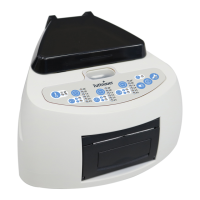

 To Next Page