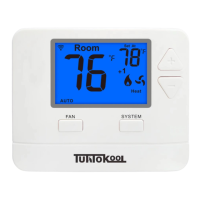
This document provides a user manual for the TuttoKool Thermostat, Model Number: TK-701. It covers the device's functions, usage, and maintenance, including battery installation and warranty information.
Function Description:
The TuttoKool TK-701 is a digital thermostat designed to control heating and cooling systems. It allows users to set and monitor room temperature, manage fan operation, and switch between different system modes (Heat, Cool, Off). The device features an LCD display for easy readability of current room temperature and setpoint temperature.
Important Technical Specifications:
- Model Number: TK-701
- Power Source: Requires AAA batteries (1.5V AAA). High-quality alkaline batteries are recommended.
- Warranty: 3-year limited warranty, requiring registration within 60 days of installation.
Usage Features:
-
LCD Display (1): The LCD display shows both the current room temperature and the setpoint temperature. It also indicates system operation modes and low battery status.
- Room Temperature Display: Shows the current temperature in the room.
- Setpoint Temperature Display: Shows the desired temperature the user has set.
- System Operation Indicators: Icons for COOL, HEAT, EmH (Emergency Heat), or fan will display when the respective system is active.
- Compressor Delay Feature: If the system operation icons are flashing, it indicates that the compressor delay feature is active. The compressor will turn on after a 5-minute delay has elapsed.
-
Fan Switch (2): This switch controls the fan's operation mode.
- ON: Runs the fan continuously, regardless of whether the heating or cooling system is active.
- AUTO: Cycles the fan on and off only when the heating or cooling system is actively running.
-
System Switch (3): This switch allows users to select the desired operating mode for the HVAC system.
- HEAT: Activates the heating system to raise the room temperature to the setpoint.
- COOL: Activates the cooling system to lower the room temperature to the setpoint.
- OFF: Turns the entire system off, disabling both heating and cooling functions.
-
Temperature Setpoint Buttons (4): These are the "+" and "-" buttons used to adjust the desired room temperature (setpoint) up or down. Pressing "+" increases the setpoint, while pressing "-" decreases it.
Maintenance Features:
-
Battery Door (5): Located on the device, the battery door provides access for installing or replacing the batteries.
- Battery Installation: To activate the thermostat, remove the tab located between the batteries.
- Low Battery Indicator: The LCD display includes a low battery indicator icon. When this icon appears, it is crucial to replace the AAA batteries immediately.
- Caution: Failure to replace batteries when indicated can lead to the heating and cooling system becoming frozen or overheating, potentially causing damage or malfunction. High-quality alkaline batteries are recommended for optimal performance and longevity.
-
Warranty Registration:
- The thermostat comes with a 3-year limited warranty.
- To ensure the warranty period begins from the date of installation, users must register their thermostat within 60 days of installation. If not registered, the warranty period will commence from the date of manufacture.
- For warranty-related issues, users are advised to contact the HVAC professional who installed the product.
- Registration can be completed by filling out a provided form with details such as Name, Address, City, State, Zip, Thermostat Model, Date Installed, and Thermostat SN, then mailing it to:
Tuttokool
4350 Seaboard Rd,
Orlando FL 32808

 Need help?
 General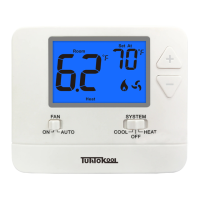

 To Next Page