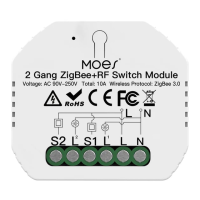
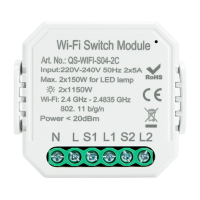
WIFI Switch Module
INSTRUCTION MANUAL
INSTALLATION
Warnings:
1.
Installation must be carried out by a qualified
electrician in accordance with local regulations.
2. Keep the device out of reach of children.
3. Keep the device away from water , damp or hot
environment.
4. Install the device away from strong signal sources
such as microwave oven that may cause signal
interruption resulted to abnormal operation of the
device.
5. Obstruction by concrete wall or metallic
materials may reduce the effective operation
range of the device and should be avoided.
6. Do NOT attempt to disassemble,repair or modify
the device.
FAQ
Q1: What should I do if I can’t configure the switch module?
a. Please check whether device is powered on.
b. Make sure your mobile and switch module
are under the same 2.4 Ghz WIFI network.
c. Whether it’s in good internet conditions.
d. Make sure the password entered in App is correct. e. Make
sure the wiring is correct.
Q2: What device can be connected to this Wi-Fi switch module?
Q3: What happens if the WIFI goes off?
Most of your household electrical appliances can be,
such as lamps, laundry machine, coffe maker, etc.
You can still control the device connected the switch
module with your traditional switch and once WIFI is active
again the device connected to module will connect
automatically to your WIFI network.
Q4: What should I do if I change the WIFI network or
change the password?
You have to re-connect our Wi-Fi switch module to the new
Wi-Fi network accordingly as per the App User Manual.
Q
5: How do I reset the device?
Power on/off device for 5 times until the indicator light ash.
with mounting clip
Wiring Instructions and Diagrams
1.Turn off the power supply before carrying out any
electrical installation work.
2. Connect wires according to the wiring diagram.
3. Insert the module into the junction box.
4. Turn on the power supply and follow switch module
configuration instructions.
Notes: Take your smartphone close to the switch
sure you have min. 50% Wi-Fi signal.
1CH,2CH,3CH,4CH
TECHNICAL SPECIFICATIONS
Product type Wi-Fi Switch Module
Voltage
AC100-240V 50/60Hz
Max. load 1CH:
10A/16A 2CH: 2x5A
Operation
frequency
2.412GHz-2.484GHz
Operation temp. -10℃ + 40℃
Protocol WIFI IEEE 802.11b/g/n
Operation range <100 m
Dims (WxDxH) 39.2x39.2x18 mm
IP rating IP20
Warranty
2years
3CH: 3x3.3A 4CH: 4x2.5A
Without Switch
Single Control
Double Switch
1CH Wi-Fi Switch Module
2CH Wi-Fi Switch Module
Without Switch
Single Control
Double Switch
3CH
Wi-Fi
Switch Module
Without Switch
Single Control
Double Switch
L2
L1
N
COM
L3
S2
S1
S3
L
L N
L2
N
COM
L3
S2
S1
S3
L1
L
L N
L2
L1
N
COM
L3
S2
S1
S3
L
L N


 To Next Page
 Need help?

 General