EasyManua.ls Logo

TUYA DY-105 - User Manual

TUYA DY-105
4 pages
Print Icon
To Next Page IconTo Next Page
Loading...
@(Do@@o
8888
DY-I
05
Heating
Thermostat
Manual
4s.h h,
'\,.h,
r-\
lf,J
l3F Lrs
t3ts
t!{
hr
r--rrj
r--cD--I
Application
The
thermostat
is
designed
for
control
of
electric
heating
devices
(Built
in
sensors for
measuring
room
temperature
and
external
sensor
for
high temperature
protection,
to
prevent
heating
device
burned
due to high
temperature).
User
Operation
(S
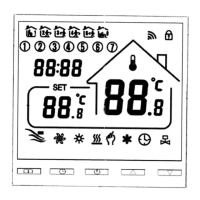
Power
Key
: Touch
the
On / Off key
to
turn the
system
on or
off.
c[J Mode
Key :You
can
select
"period
control
mode"
or
"manual
mode,,
by this
key.
Av
up / Down
key: Touch
the
up and
Down
keys
to
setthe temperature
and
adjust
system
parameters.
And
press
Up and
Down
simultaneously
and hold
for
s seconds
to
enter
lock key
function.
@
Clock
key:
You
can
adjust
the
time
and the
week
by this key.
0
Manual
mode:
Set
the temperature
manually
by this
key.
@
Automatic
mode:Adjust
to
the
automatic
mode,
the
thermostat
will
work
cyclically
by week
programming
Anti-frozen
function
ln
the
state
of
shutdown,
the
thermostat
will
turn
on the
heating
device
automatically
when
the
room
temperature
is
below
s"c. when
the
room
temperature
is
above
7.c,
the
thermostat
will turn
off the
heating
device
automatically.
Technical
data
1.
Temperature
sensor:
NTC
3.Power
consumption:
<
1W
2.Temperature
accuracy:
+
1"C
4.Voltage:
AC230V
50/G0Hz'
t
88;
88.r'
Question and Answer IconNeed help?

Do you have a question about the TUYA DY-105 and is the answer not in the manual?

TUYA DY-105 Specifications

General IconGeneral
BrandTUYA
ModelDY-105
CategoryThermostat
LanguageEnglish

Related product manuals