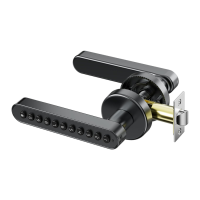
This document describes an "INTELLIGENT House electronic lock" or "Smart Door Lock," providing a user manual for its installation, operation, and an optional wireless module.
Function Description
The Smart Door Lock is an electronic lock designed for residential use, offering multiple unlocking methods and smart home integration capabilities. It aims to enhance property safety and convenience through advanced technology.
Core Lock Functions:
- Multiple Unlocking Methods: Supports fingerprint, password, IC card, and mechanical key unlocking.
- Administrator Management: Allows adding up to 3 administrators (fingerprint, password, or IC card) who have full control over the lock's settings.
- User Management: Supports up to 300 unlock information entries for regular users.
- Initialization: Resets the lock to its default state, with a default initialization password of "123456" or any fingerprint for unlocking.
- Normal Unlock Mode: A standard operating mode for daily use.
- Silent Mode: Allows unlocking without voice prompts.
- Security Features:
- Anti-Tamper Lockout: Continuously inputting wrong information 6 times blocks the keyboard for 1 minute.
- Low Voltage Alarm: Alarms when the voltage drops below 4.8V, allowing approximately 200 more unlocks before delayed processing.
- Language Change: Supports Chinese and English languages (input "555666888#" in initialization status).
Wireless Module (Optional) Functions (Tuya_WIFI module):
- Remote Unlocking: Allows unlocking the door remotely via the Tuya Smart Home APP.
- Dynamic Password Generation: Generates temporary passwords that change every 5 minutes and can be used for limitless times within their validity period.
- Temporary Password Management: Creates and manages temporary passwords with defined names and valid periods, released from the cloud to the lock.
- Unlock Record Reporting: Records unlocking events in the APP (after a user is added).
- Family/Member Management: Integrates with the Tuya APP's family management system, allowing users to be added to family member lists, receive prompt messages, and manage room information.
- Low Battery Alarm (APP): Notifies users of low battery via the APP.
- Lock Picking Alarm (APP): Alarms if the lock is tampered with.
- Continuously Wrong Tryout Alarm (APP): Notifies of multiple incorrect unlock attempts.
- Doorbell Calling Record (APP): Records doorbell activations.
- Time Synchronization: Synchronizes the lock's time with the cloud automatically 15 seconds after every unlock.
Important Technical Specifications
- Battery Type: 4PCS 1.5V AAA (5#) Alkaline battery. Mixing old and new batteries or using non-Alkaline batteries can damage the lock. Batteries are not included in the package due to shipping prohibitions.
- Mortise Dimensions: 50MMx50MM mortise (22X160MM).
- Square Steel: 8x8x80mm.
- Screws:
- Cross round head screw: 4x30mm, 4x45mm.
- Screw bolt: 4x5x30mm, 4x5x35mm.
- IC Card: 2PCS included.
- Wireless Module Power Consumption:
- Sleep mode: <20uA.
- Working mode: ~50mA.
- Low Voltage Threshold: 4.8V.
Usage Features
Installation:
- Professional Installation Recommended: Due to the high-tech nature of the product, professional locksmith installation is recommended after house decoration is complete, following company standard instructions.
- Initialization After Installation: Immediately initialize the lock and set up electronic keys to prevent unauthorized access.
- Door Opening Direction Adjustment: The lock handle and latch direction must be adjusted based on the door's opening direction (left or right opening).
- Mortise Direction Change: The latch bolt direction can be adjusted by pushing it down, turning the stop block 180 degrees, and reinserting the latch bolt.
Operation:
- Adding Administrators: Short click the set button (rear panel) and follow voice prompts to add fingerprint, password, or IC card administrators.
- Adding Unlock Information:
- Method 1: Short click the set button, verify administrator, then enter unlock information.
- Method 2: Click the touch panel, press "*", then "#", verify administrator, then input "1" to enter add user mode and enter unlock information.
- Deleting Unlock Information: Click the touch panel, press "*", then "#", verify administrator, input "2" to enter delete user mode, then enter the delete code.
- Enabling/Disabling Normal Unlock Mode: Click the touch panel, press "*", then "#", verify administrator, input "3".
- Enabling/Disabling Silent Mode: Click the touch panel, press "*", then "#", verify administrator, input "4".
- Remote Unlock (with Wireless Module):
- Ensure WIFI module is connected to the cloud.
- Wake up the Tuya module (by touch or pressing "9#").
- Wait for the module to connect to the cloud; "unlock remotely" button appears in the APP.
- Click the button to confirm unlocking.
- Dynamic Password (with Wireless Module):
- Get the password via the APP's "Get the password" function.
- Wake up the Tuya module (by touch or pressing "9#").
- Enter the dynamic password on the lock.
- Temporary Password (with Wireless Module):
- Create a temporary password in the APP (password, name, valid period).
- Wake up the Tuya module (by touch or pressing "9#").
- Wait for the lock to connect to the internet and receive the password from the cloud.
- Enter the temporary password on the lock.
Maintenance Features
- Battery Replacement: Replace batteries when the low voltage alarm sounds. The lock can still open approximately 200 times after the alarm, but delayed processing will occur afterward. Use only 4PCS 1.5V AAA (5#) Alkaline batteries of the same brand.
- Regular Content Updates: The company regularly updates the manual content. Users with questions should contact the company for consultation.
- Firmware/Product Upgrades: Products may be upgraded to improve performance, reliability, and safety, which may lead to inconsistencies with the manual without prior notice.
- Troubleshooting:
- Keyboard Blocked: If the keyboard is blocked for 1 minute after 6 continuous wrong inputs, wait for the lockout period to end.
- Temporary Password "To-Be-Released" Status/Dynamic Password Not Working: Wake up the module to connect to the internet, allowing passwords to be released to the lock.
- WIFI Module Status Check: Observe the indicator light:
- Always lit: Connected to the cloud.
- Flashing very quickly (50ms): In internet matching status.
- Flashing slowly (100ms): Matching successfully, connecting to the cloud.

 Need help?
 General

 To Next Page