Need help?
Do you have a question about the TUYA A210 and is the answer not in the manual?
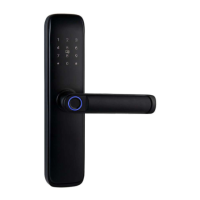
Details components like fingerprint sensor, keypad, and handles.
Details components like battery box, back handle, and lock cylinder.
Procedure to reset the lock to its default factory settings.
Instructions for drawing center lines and hole positions on the door.
Guidance on identifying the correct door handing for installation.
Steps to adjust the direction of the front and back handles.
Steps for assembling the mortise into the door slot.
Instructions for fixing the cylinder with screws.
Procedure to attach the front panel to the door.
Procedure to attach the back panel to the front panel.
Steps for installing the strike plate and strike box.
Testing the lock's functionality with the mechanical key.
Initial setup process for the smart lock.
Setting up the primary administrator password.
Procedure to remove the master password.
Adding new user passwords for access.
Procedure to remove user passwords.
Adding new IC cards for access.
Procedure to remove user IC cards.
Adding new user fingerprints for access.
Procedure to remove user fingerprints.
Configuration options for the lock's system.
Process to reset various settings of the lock.
Configuration for connecting the lock to a network.
Steps for connecting the lock via EZ mode using Wi-Fi.
Guidance on creating a user account for the Tuya smart app.
App-based configuration for network connectivity.
App-guided connection using EZ mode.
App-guided connection using AP mode.
Alternative connection method using Bluetooth Low Energy.
Using the app to remotely unlock the door.
Generating temporary passwords via the app.
Creating one-time or time-limited offline passwords.
Connecting the lock with other smart devices.
Overview of the user manual and lock usage.
Important safety precautions and usage guidelines.
Information on warranty, service, and terms of use.
 General
| Material | Zinc Alloy |
|---|---|
| Connectivity | Wi-Fi |
| Power Source | Battery |
| Power Supply | 4 AA Batteries |
| Unlock Methods | Fingerprint, Mechanical Key |
| Compatibility | Tuya Smart App |
| Operating Humidity | 20% |


 To Next Page