26
12d. Notification area
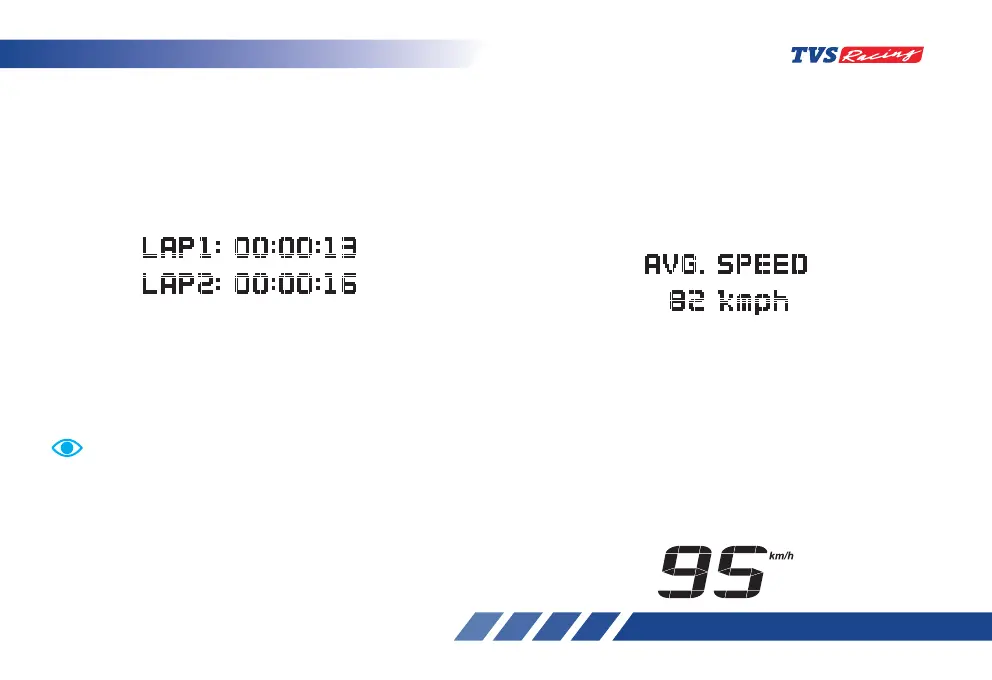
A general purpose notification area where, ride
mode information, error information, service due,
connectivity information, warnings are displayed. In
this area if the mobile device is not connected, Avg.
speed is displayed. If bluetooth device is connected
same Avg. speed can be accessed using “SET”button
on speedometer.
12e. High speed indicator
High speed indicator records the maximum speed
(top speed) achieved by the rider so far either in
km/h or mph as per preferred setting. You can
reset and record the new speed if required. Refer
page No. 34 for resetting the high speed data.
On entering th high speed mode previously achieved
high speed data will be displayed in the instrument
cluster as shown.
Press the ‘Info switch’ again to stop the current lap
timer and to start a new lap. Existing lap timings will
be displayed as shown below and continue to get
updated whenever a new lap is started and stopped.
Long press the ‘Info switch’ for few seconds (more
than 1 second and less than 3 seconds) to stop the
lap timer count.
To start a lap timer again, after stopping it by pressing
the ‘Info switch’, the lap timer need to be reset
as explained page No. 34. You can record any
number of laps but last three lap’s details only will be
displayed in the cluster.
Lap timer works only when the lap timer mode is active.
Once the lap timer is stopped by pressing the ‘Info
switch’, the timer cannot be started again until the timer
is reset. Only last three lap’s timing will be displayed
in the cluster on entering the lap timer mode.













 To Next Page