SYMBOLS BUTTONS OPERATIONS
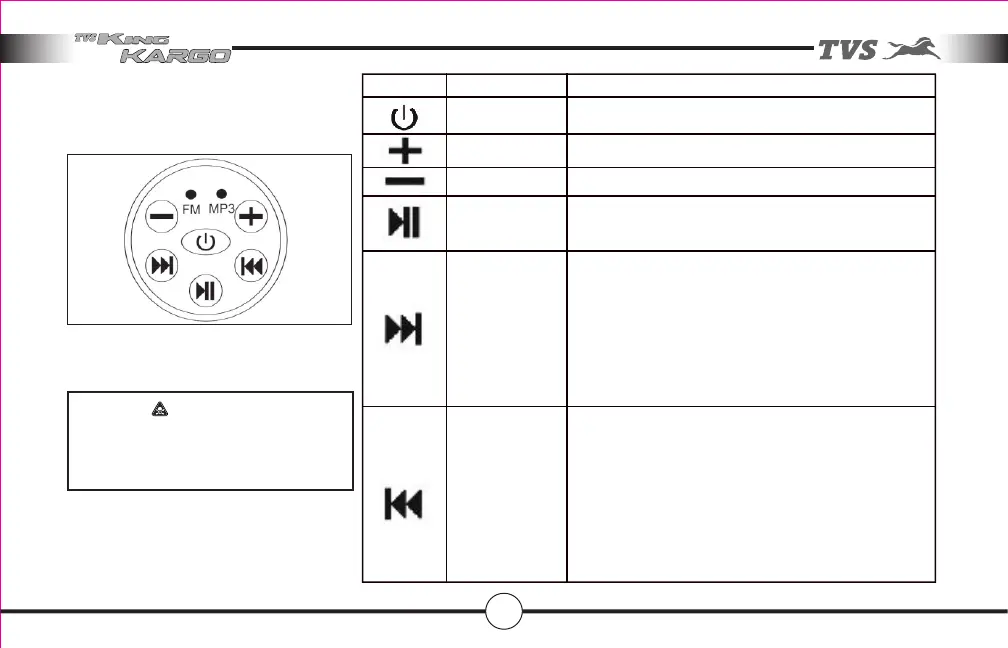
ON / OFF To switch ON & OFF the system
Volume Up To increase volume
Volume Down To decrease volume
Forward
Reverse
Play / Pause In Bluetooth mode and MP3 mode:
To Play or Pause the tracks
Not function in FM mode
In Bluetooth mode and MP3 mode:
To Play next track
For fast forward press this switch continuously
after reaching the last song use reverse to reach
the first song
In FM mode:
Tune to Next channel. Once highest frequency is
reached use reverse button to reach lower
frequency
In Bluetooth mode and MP3 mode:
To Play previous track
For fast reverse press this switch continuously
after reaching the first song use forward to reach
the last song
In FM mode:
Tune to Previous channel. Once lowest frequency
is reached use forward button to reach higher
frequency
029
The various switch cluster operations of
music system are listed as follows:
Switch cluster has a waterproof sticker
on its top, replace this sticker without
fail whenever it peels off.
CAUTION
Features in your vehicle



 To Next Page