030
Switching operations ( ):
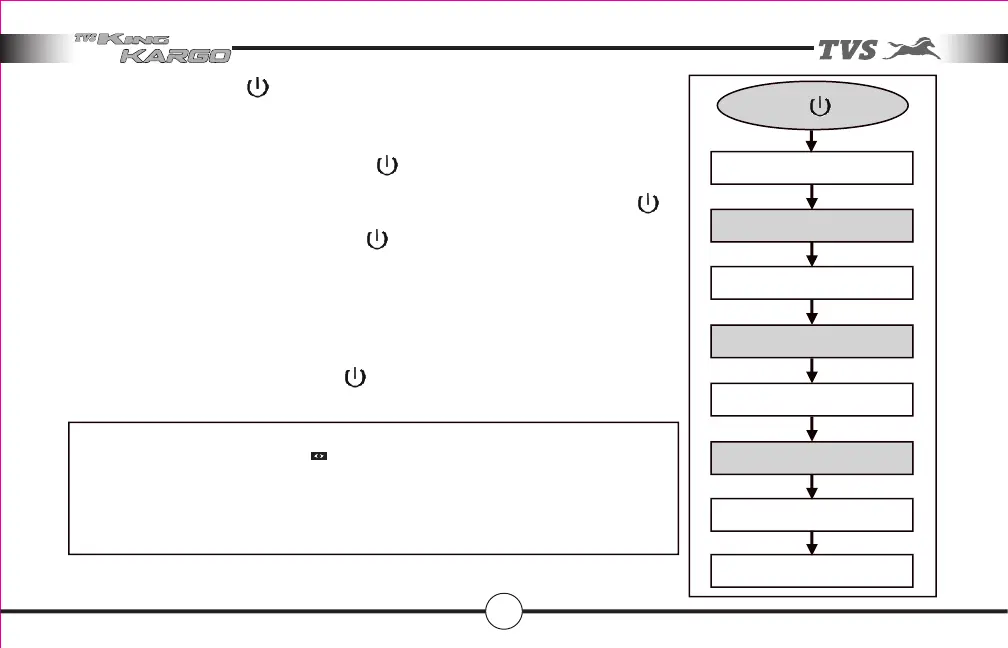
Power on switch has 4 position toggle mode operations (refer drawn flow chart).
After switching on ignition key, press once ‘ ‘, music system starts automatically on
Bluetooth mode. At this position indicator provided for Bluetooth will start glowing
continuously. To change the mode from Bluetooth to MP3 press once the button ‘ ‘.
At this position continuously glowing the same indicator. Then next to change the mode
from Mp3 to FM press once the button ‘ ‘. At this position continuously glowing
indicator also shifts towards FM indicator.
Flash drive with MP3 songs stored in it shall be inserted before switching ‘ON’ music
system or after switching ‘ON’ ignition key and removal of flash drive can be done both in
ignition ‘ON’ and ‘OFF’ condition.
To switch off music system press button ‘ ‘ once.
NOTE
This music system is designed to play only MP3 files stored in Flash drive.
It searches MP3 files automatically and starts playing once the external source is
connected.
ON/OFF ( ) Switch
BLUETOOTH MODE
FOURTH PRESS
SWITCH OFF
FIRST PRESS
MP3 MODE
SECOND PRESS
THIRD PRESS
FM MODE
Features in your vehicle



 To Next Page