031
Volume Control
This system has 8 steps of volume control. To increase the
volume by one step press ' + ' button once, keep
pressing ' + ' to get required volume level.
To decrease volume use button ' ' accordingly.
During switch 'ON' the system starts with default of
50% volume.
Forward / Reverse
In Bluetooth Mode:
Press( ) button to switch on the Music system.
Music system will enter into “Bluetooth” mode.
Mp3 LED will start blink and FM mode continuously on for
Bluetooth mode.
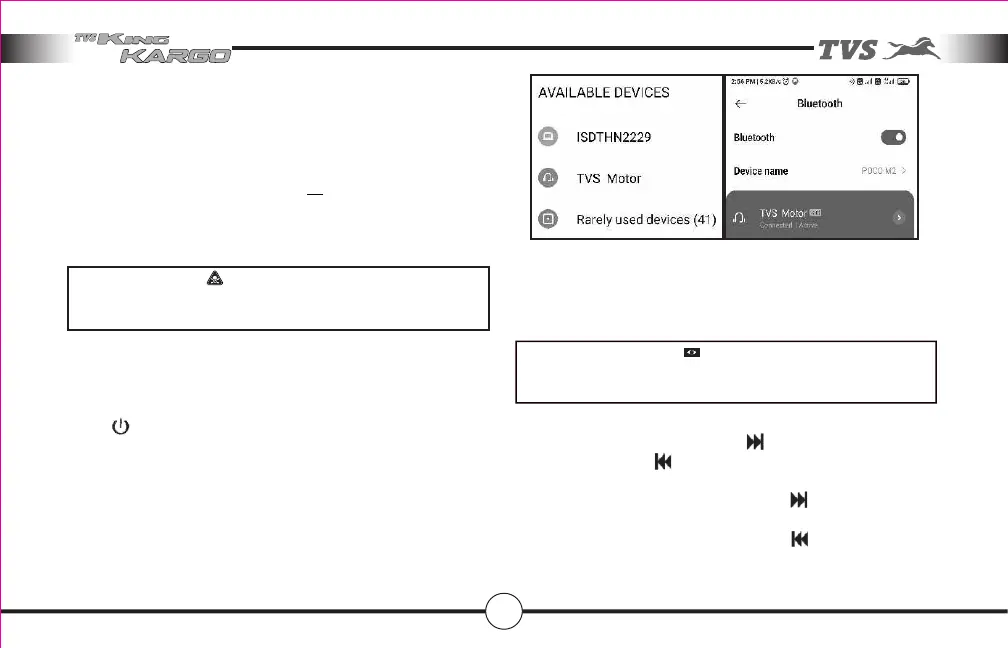
Switch on the Bluetooth in smart phone and scan the device.
Select TVS MOTOR and pair the device.
After pairing, you can play the songs from smart phone.
Press (+) button to increase the volume and Press (-) button to
decrease the volume
In Mp3 Mode:
To play next song press button ‘ ‘ once. To play previous
song press button ‘ ‘ once. Keep pressing above buttons
continuously to get desired songs.
To fast forward press and hold button ‘ ‘ continuously for
more than 2 seconds.
To fast reverse press and hold button ‘ ‘ continuously for
more than 2 seconds.
Always maintain pleasant sound level in public places in
order to have healthy atmosphere with co riders.
CAUTION
Features in your vehicle
NOTE
In Bluetooth mode, song selection is through smart phone
only.



 To Next Page