24
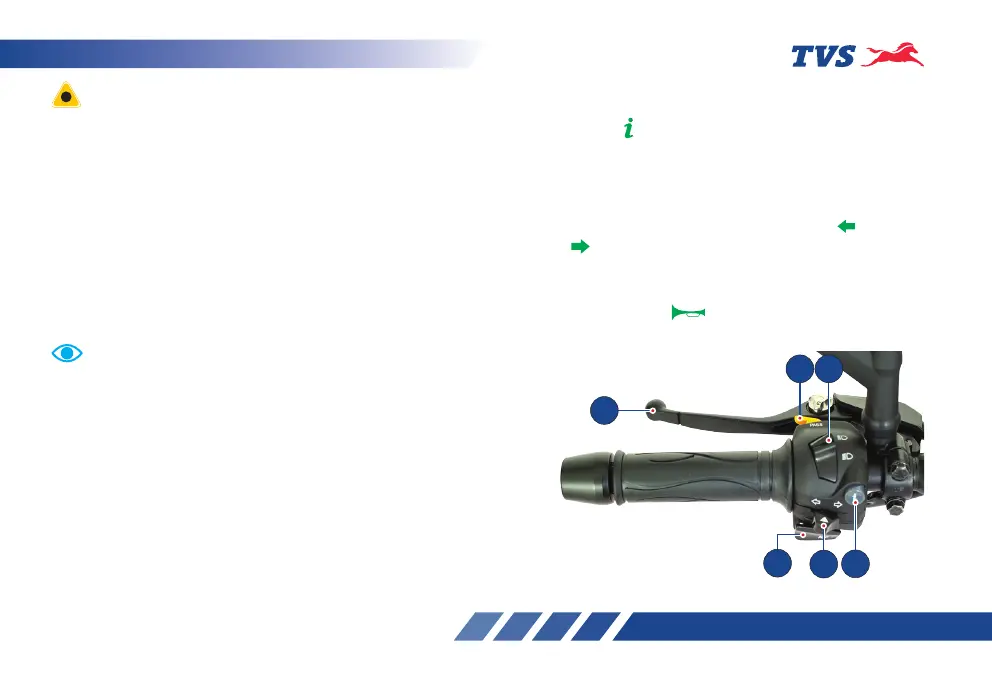
HANDLE BAR LEFT SIDE
1. Info switch*
Info switch ‘ ‘ is used to accept / reject a incoming
call, to clear notification on cluster display, invoke
voice assistant and to accept / reject the nearest fuel
location suggestion.
2. Turn signal lamp switch
Slide the turn signal lamp switch to left ‘ ’ or right
side ‘ ’ to operate the respective turn signal lamps
(LH/RH). Press the switch to turn ‘OFF’.
3. Horn switch
Press the switch ( ) to blow horn. It is used to
attract the attention of other road users in case of
danger.
4
5 6
2
1
3
Instrument cluster’s background illumination, front
position lamp (FPL), tail lamp and number plate lamp
glow automatically once the ignition is turned ‘ON’
without activating any other switch.
When the ignition switch is turned ‘ON’, the instrument
cluster performs a self check and the details like ‘ride
mode’, ‘ODO’ will be displayed in the cluster’s display.
Incase of connected instrument cluster, the cluster
displays the product name ‘RONIN’ followed by a
greeting message ‘HAVE A SAFE RIDE’ will be displayed.
Wait till the cluster’s display becomes static.
Before turning the ignition key to ‘ON’ position, ensure
the availability of adequate fuel in the tank to avoid dry
run of fuel pump. Fuel level always to be maintained
above empty indication (Low fuel indication icon glow).
Never run the fuel pump dry to avoid failure of fuel
pump.
Leaving the ignition cum steering lock in ‘ON’ position
for a prolonged time will drain the battery when the
vehicle is not in use. Switch ‘OFF’ and take the key out
when the vehicle is not in use.
* Applicable for Connected instrument cluster version only














 To Next Page